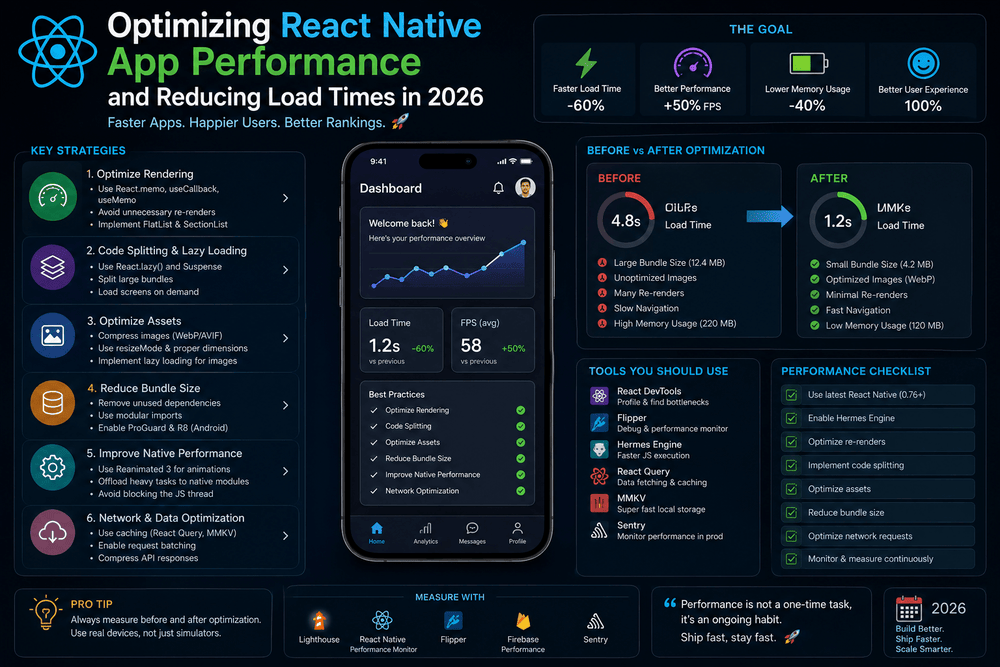
Optimizing React Native App Performance and Reducing Load Times in 2026
A fast mobile application is no longer a luxury. Users expect apps to launch quickly, respond immediately to interactions, and remain smooth even when handling large amounts of data. When an application takes too long to start or becomes slow while navigating between screens, users may abandon it before discovering its value.
For React Native developers, performance optimization should be considered throughout the development process rather than treated as a final step before release.
React Native makes it possible to build Android and iOS applications using JavaScript or TypeScript and a shared codebase. However, a cross-platform architecture does not automatically guarantee excellent performance. Rendering patterns, JavaScript execution, images, network requests, navigation, memory usage, and application architecture can all influence the final experience.
In this guide, we will explore practical ways to optimize React Native app performance and reduce load times without making the application unnecessarily complicated.
Why React Native App Performance Matters
Performance affects more than technical benchmarks.
A fast application generally provides a better user experience. When users tap a button, they expect a visible response. When they open a screen, they expect useful content to appear quickly. When they scroll through a list, they expect it to remain responsive.
Poor performance can appear in several forms:
- Slow application startup
- Delayed screen transitions
- Laggy scrolling
- Excessive memory consumption
- Slow image loading
- Unnecessary component renders
- Delayed responses to user interactions
- Large application downloads
- Excessive network requests
The important point is that performance problems often have multiple causes. Optimizing only one part of the application may not produce a noticeable improvement.
The best strategy is to measure first, identify the bottleneck, and then optimize the specific problem.
1. Measure Performance Before Optimizing
One of the biggest mistakes developers make is optimizing code based on assumptions.
Instead of guessing which component is slow, use profiling and measurement tools.
React Native provides official performance guidance covering areas such as JavaScript performance, frame rates, and development-versus-production behavior.
Before changing your architecture, identify:
- Startup time
- JavaScript execution cost
- UI rendering performance
- Memory usage
- Network latency
- Image loading time
- Screen transition performance
You should also test performance in a release build rather than relying exclusively on development mode.
Development builds often include additional debugging and development features that can make an application appear slower than its production version.
A useful performance workflow
Measure
   ↓
Identify bottleneck
   ↓
Change one thing
   ↓
Measure again
   ↓
Keep or revert the change
This approach is much more reliable than randomly adding optimization techniques.
2. Optimize React Native App Startup Time
Startup time is one of the first performance characteristics users notice.
When someone launches your application, several things can happen before the first useful screen becomes interactive.
The application may need to:
- Initialize JavaScript
- Load required modules
- Initialize navigation
- Read local data
- Restore authentication state
- Configure analytics
- Initialize third-party SDKs
- Request remote data
If everything happens immediately during startup, the initial experience can become unnecessarily slow.
Avoid unnecessary startup work
Ask yourself:
Does this operation really need to happen before the first screen appears?
For example, analytics initialization or certain background data requests may be delayed until after the initial interface becomes usable.
This technique is often called deferred initialization.
Instead of doing everything at launch:
Launch
 ↓
Initialize everything
 ↓
Load data
 ↓
Configure services
 ↓
Display UI
Aim for:
Launch
 ↓
Display useful UI
 ↓
Initialize non-critical services
 ↓
Load secondary data
The goal is not to eliminate initialization but to prioritize what the user actually needs first.
3. Reduce Unnecessary React Component Re-Renders
React Native applications use React components, and unnecessary re-renders can create avoidable work.
A component may re-render when its state or props change. Sometimes that is necessary. Sometimes the component is updating even though its visible output does not need to change.
React provides tools such as:
React.memouseMemouseCallback
These can help in appropriate situations.
For example:
const ProductCard = React.memo(function ProductCard({ product }) {
  return (
    <View>
      <Text>{product.name}</Text>
      <Text>{product.price}</Text>
    </View>
  );
});
However, optimization tools should not be added everywhere automatically.
Memoization introduces its own complexity and can sometimes provide little benefit.
A better approach is to identify components that actually re-render unnecessarily and optimize those areas.
4. Use FlatList for Large Lists
Displaying a large number of items is a common source of performance problems.
Rendering hundreds of complex components simultaneously can consume significant memory and processing resources.
React Native provides FlatList for efficiently rendering long lists.
For example:
<FlatList
  data={products}
  keyExtractor={(item) => item.id.toString()}
  renderItem={({ item }) => (
    <ProductCard product={item} />
  )}
/>
FlatList is designed to render list content efficiently rather than creating every item at once.
For large datasets, pay attention to properties such as:
keyExtractorinitialNumToRenderwindowSizemaxToRenderPerBatchremoveClippedSubviews
Do not blindly change every list property.
Different applications have different requirements, so measure the result after each change.
5. Optimize Images
Images are often among the largest assets in a mobile application.
A screen containing several large images can require substantial memory and network bandwidth.
Using a high-resolution image when a much smaller image would be sufficient wastes resources.
Practical image optimization techniques
Use:
- Proper image dimensions
- Modern compression formats where appropriate
- Thumbnail versions for lists
- Caching
- Lazy loading
- Responsive image sizes
- Optimized remote image delivery
For example, a product listing does not necessarily need the same enormous image used on a product detail screen.
Instead:
Product List → Small optimized image
Product Detail → Larger optimized image
This simple strategy can reduce both bandwidth usage and memory consumption.
6. Avoid Loading Too Much Data at Once
Your backend can also influence React Native performance.
Imagine a mobile application requesting 10,000 products when the user only needs the first 20.
The application has to receive, parse, store, and potentially render unnecessary data.
Instead, use techniques such as:
- Pagination
- Cursor-based pagination
- Server-side filtering
- Search endpoints
- Lazy loading
- Incremental data fetching
For example:
Request:
GET /products?page=1&limit=20
Instead of:
GET /products
when the second endpoint returns thousands of records.
A well-designed API and an optimized mobile interface should work together.
7. Minimize Unnecessary Network Requests
Network activity can make an application feel slow even when the UI itself is well optimized.
Consider an application that loads a dashboard and sends ten separate requests immediately.
Depending on network conditions, the user may wait for multiple operations before the interface becomes useful.
You can improve this by:
- Combining related requests when appropriate
- Caching data
- Avoiding duplicate requests
- Loading secondary information later
- Using pagination
- Requesting only required fields
- Handling offline or poor-network conditions gracefully
Caching is especially useful for information that does not change frequently.
For example, application settings or previously loaded content may not need to be downloaded every time a screen opens.
8. Optimize Navigation
Navigation performance can become noticeable in applications with many screens.
Avoid performing expensive work every time a screen receives focus unless that work is genuinely required.
For example, repeatedly downloading the same data whenever a user returns to a screen can create unnecessary network traffic and processing.
Instead, consider:
- Caching previously loaded data
- Refreshing only when necessary
- Separating initial loading from refresh operations
- Avoiding expensive computations during transitions
The exact solution depends on your navigation architecture and data requirements.
The principle is simple:
A screen should do only the work necessary for the user’s current action.
9. Keep Expensive JavaScript Work Off Critical Interactions
React Native applications can perform significant work in JavaScript.
If expensive JavaScript operations occur while the user is interacting with the application, the interface may feel unresponsive.
Examples include:
- Large data transformations
- Complex filtering
- Processing huge arrays
- Expensive calculations
- Parsing large datasets
- Repeated synchronous operations
Instead of repeatedly performing an expensive calculation during rendering, consider whether the result can be calculated less frequently or moved to a more appropriate part of the application.
For example, avoid patterns where every render performs a large transformation:
const filteredProducts = products
  .filter(...)
  .sort(...)
  .map(...);
If the operation is expensive and the input rarely changes, you may be able to calculate it more efficiently.
10. Use Production Builds for Real Performance Testing
One of the most important React Native performance tips is simple:
Do not judge production performance entirely from development mode.
Development environments often include additional debugging functionality and development tooling.
React Native’s official performance documentation specifically warns that development mode can significantly affect JavaScript performance.
Therefore, test important performance changes using a release configuration.
A useful testing process is:
- Establish a baseline.
- Build the application for production.
- Test on a representative physical device.
- Record startup and interaction performance.
- Apply one optimization.
- Test again.
- Compare the measurements.
This gives you objective evidence instead of relying on how fast the app feels on a powerful development computer.
11. Reduce Application Bundle Size
Application size can influence installation time, download requirements, and storage usage.
Large bundles can contain:
- Unused dependencies
- Large images
- Fonts
- Localization resources
- Unnecessary libraries
- Duplicate functionality
Review your dependencies regularly.
Before installing a package, ask:
Do I really need this dependency?
If a small function can be implemented safely with a few lines of code, adding a large library may not always be worthwhile.
At the same time, avoid prematurely removing useful dependencies simply because they increase bundle size slightly. Optimization should be based on measurable impact.
12. Be Careful With Third-Party Libraries
Third-party packages can dramatically accelerate development.
However, every dependency can potentially introduce:
- Additional JavaScript
- Native code
- Initialization work
- Maintenance requirements
- Compatibility concerns
Before adding a library, check:
- Is it actively maintained?
- Does it support your React Native version?
- Does it support your target platforms?
- Is the documentation clear?
- Does it solve a problem you actually have?
A smaller dependency footprint can make an application easier to maintain and troubleshoot.
13. Optimize Animations
Animations can make mobile applications feel polished, but poorly implemented animations can negatively affect responsiveness.
Animations should be designed to minimize unnecessary work and should be tested on lower-powered devices.
React Native’s performance guidance discusses the distinction between the JavaScript thread and UI-related work, which is important when diagnosing animation problems.
When an animation becomes noticeably choppy, do not immediately assume the entire application is slow.
Profile the animation and identify whether JavaScript execution, rendering, layout, or another operation is responsible.
14. Use Hermes Where Appropriate
Hermes is a JavaScript engine optimized for React Native applications.
React Native documentation describes Hermes as an open-source JavaScript engine optimized for React Native and notes that it can improve startup time, memory usage, and application size in appropriate scenarios.
Modern React Native projects commonly use Hermes, but you should still verify your project’s configuration and framework version.
The important lesson is that JavaScript engine configuration can influence application performance, particularly around startup and memory behavior.
15. Improve Memory Management
Memory problems can cause applications to become unstable, especially on devices with limited resources.
Common causes include:
- Keeping unnecessary objects in memory
- Loading oversized images
- Retaining large datasets
- Excessive caching
- Components that continue unnecessary work
- Poorly managed subscriptions or listeners
When investigating memory issues, look for objects or resources that remain alive longer than necessary.
Do not assume that increasing device resources will solve the problem.
Good memory management is part of good mobile application engineering.
16. Avoid Premature Optimization
Performance matters, but optimization should not make your application unnecessarily difficult to understand.
For example, adding complex memoization to every component may make the code harder to maintain without producing a meaningful improvement.
The better principle is:
Optimize measurable bottlenecks, not imaginary ones.
Start with high-impact areas:
- Startup time
- Large lists
- Images
- Network requests
- Expensive rendering
- Memory usage
- Application bundle size
These areas frequently provide more value than micro-optimizing small pieces of code.
React Native Performance Optimization Checklist
Before releasing your application, review the following:
- Test the application in a production-style build.
- Measure startup performance.
- Optimize large images.
- Use
FlatListfor long lists. - Reduce unnecessary component renders.
- Avoid duplicate API requests.
- Implement sensible caching.
- Use pagination for large datasets.
- Review third-party dependencies.
- Monitor memory usage.
- Test animations on real devices.
- Review application bundle size.
- Test on lower-powered hardware.
- Measure performance after every major optimization.
This checklist is not a substitute for profiling, but it provides a useful starting point.
The Best React Native Performance Strategy in 2026
React Native performance optimization is no longer about finding one magical configuration that makes every application faster.
Modern performance engineering is about understanding the complete application.
Your frontend, backend, assets, navigation, state management, network architecture, and device environment all contribute to the final experience.
A useful strategy is to divide performance into four categories:
Startup Performance
How quickly does the application become usable?
Rendering Performance
Can the interface remain responsive while users scroll, navigate, and interact?
Network Performance
Does the application request and process data efficiently?
Resource Performance
Does it use memory, CPU, storage, and bandwidth responsibly?
Thinking about performance in these categories makes troubleshooting much easier.
Final Thoughts
Optimizing React Native app performance and reducing load times is a continuous process rather than a single development task.
The most effective improvements usually come from identifying real bottlenecks instead of blindly applying optimization techniques.
Start by measuring your application’s startup time, rendering behavior, network activity, memory usage, and bundle size. Then focus on the areas that have the greatest impact on users.
Use efficient lists for large datasets, optimize images, reduce unnecessary network requests, avoid expensive rendering work, review dependencies, and test production builds on real devices.
React Native continues to evolve, and the official documentation should remain your primary reference when framework behavior, architecture, or recommended tooling changes.
The ultimate goal is not simply to achieve a better benchmark.
It is to create an application that opens quickly, responds naturally, uses resources efficiently, and gives users a consistently smooth experience.
When performance becomes part of your development process from the beginning, you can avoid many expensive problems later—and build React Native applications that are easier to scale, maintain, and improve.
Frequently Asked Questions
How can I make my React Native app load faster?
Start by measuring startup performance, reducing unnecessary initialization, optimizing images and dependencies, minimizing network requests, and testing a production build.
Why is my React Native app slow?
Common causes include unnecessary component renders, large lists, oversized images, expensive JavaScript operations, excessive API requests, memory problems, and development-mode overhead.
Does Hermes improve React Native performance?
Hermes is optimized for React Native and can improve characteristics such as startup time, memory usage, and application size depending on the project.
Is FlatList better than ScrollView for large lists?
For large or dynamic datasets, FlatList is generally more appropriate because it is designed to render list content efficiently instead of rendering a large collection of items simultaneously.
Should I optimize React Native before my application is finished?
You should consider performance from the beginning, but avoid premature optimization. Measure the application and focus on bottlenecks that have a meaningful impact on users.
Trusted Sources
- React Native Official Documentation — Performance: https://reactnative.dev/docs/performance
- React Native Official Documentation — Hermes: https://reactnative.dev/docs/hermes
- React Native Official Documentation: https://reactnative.dev/
- React Native Official Documentation — FlatList: https://reactnative.dev/docs/flatlist
- Expo Documentation: https://docs.expo.dev/
About The Author