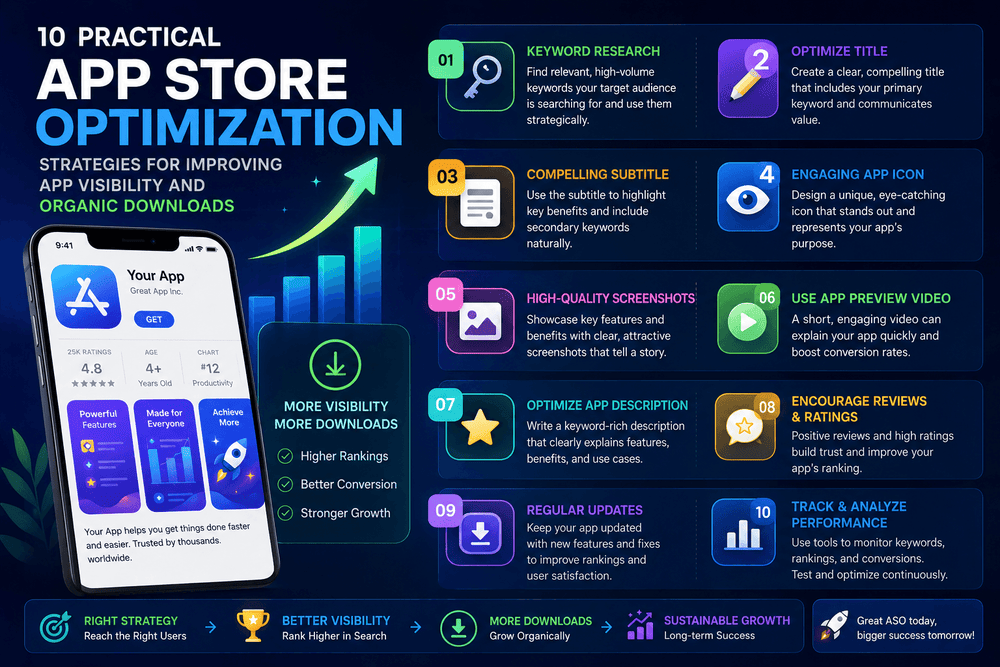
App Store Optimization (ASO) 10 Strategies to Boost Organic Downloads 2026
What Is App Store Optimization (ASO)?
App Store Optimization (ASO) is the process of improving an app’s visibility and conversion rate in app stores such as Apple’s App Store and Google Play. The goal is simple: help the right users discover an app, understand its value, and feel confident enough to install it.
A successful ASO strategy combines keyword research, compelling store listings, attractive visual assets, localization, reputation management, and continuous testing.
Unlike paid advertising, organic app discovery can continue generating results after the initial optimization work is completed. However, ASO is not a one-time task. Search behavior, competitors, app features, market trends, and user expectations can change over time.
For that reason, developers and app marketers should treat ASO as an ongoing optimization process rather than a single launch activity.
Why App Store Optimization Matters
Millions of apps compete for attention across major app marketplaces. Simply publishing an excellent application does not guarantee that people will find it.
This is where App Store Optimization (ASO) becomes important.
When your listing communicates the purpose of your app clearly and targets relevant search intent, potential users have an easier time understanding what you offer. Better visibility can bring more qualified visitors to your store page, while stronger creative assets can improve the percentage of visitors who install.
ASO can also support a broader marketing strategy. Search visibility, social media campaigns, content marketing, influencer promotion, email campaigns, and paid acquisition can all send users to an optimized product page.
The key is to make the store page consistent with the expectations created by your marketing.
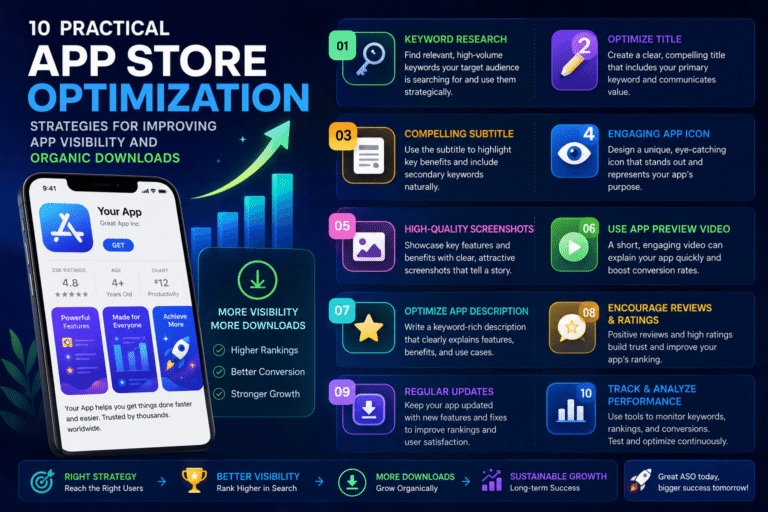
10 App Store Optimization Strategies to Boost Organic Downloads
1. Research Relevant App Keywords
Keyword research is one of the foundations of App Store Optimization (ASO).
Start by identifying the words and phrases your target audience might use when searching for an app like yours. Think beyond broad terms. A fitness application, for example, could potentially target searches related to home workouts, workout tracking, exercise planning, or beginner fitness.
The best keywords are relevant to the actual functionality of your application.
Avoid selecting keywords simply because they have high search volume. A popular keyword may attract many searches but also contain intense competition or weak user intent.
Instead, build a keyword list around:
- Your app’s primary function
- Problems your app solves
- Features users are looking for
- Specific user needs
- Long-tail search phrases
- Competitor categories
- Different use cases
Create a spreadsheet containing your target keywords and review it regularly. The objective is to build a focused keyword strategy rather than repeat the same phrase unnecessarily.
2. Write a Clear and Compelling App Title
Your app title is one of the most visible elements of your store listing.
It should communicate what your application does while remaining natural and easy to understand. Avoid turning the title into a collection of unrelated keywords.
A strong title usually combines brand identity with a clear description of the product.
For example, instead of creating a confusing title such as:
Super App – Best Free Fast Amazing Tools 2026
a better approach would be something like:
TaskFlow: Simple Task Manager
The second version immediately communicates the product’s purpose.
On Apple’s platform, the app name and subtitle have defined character limits, so every character should serve a purpose. Google Play also has specific requirements for store listing elements.
Always prioritize clarity and user understanding over keyword repetition.
3. Optimize Your App Description
Your description should answer the questions a potential user has before installing:
What does the app do?
Who is it for?
What problem does it solve?
Why should I choose it?
Write for humans first.
Use natural language to explain the most useful features and benefits. Break long sections into short paragraphs and use bullet points when they improve scanning.
For example:
- Track daily tasks
- Organize projects
- Set reminders
- Monitor progress
- Keep important information in one place
Avoid exaggerated claims that your application cannot prove. Misleading descriptions may reduce trust and can also create platform compliance problems.
Good App Store Optimization (ASO) content should accurately represent the product users will receive after installation.
4. Create Screenshots That Sell the Experience
Screenshots are not simply technical demonstrations of your interface. They are an opportunity to communicate value.
A user may decide whether an app is worth exploring within seconds, so your first screenshots should immediately explain the strongest reasons to install.
Instead of showing an interface with no context, consider adding concise visual messaging such as:
Plan Your Day in Seconds
Track Your Progress Easily
Keep Every Project Organized
The screenshot itself should still represent the real application.
Apple recommends using screenshots to communicate the app experience and highlight its strongest features. The platform supports multiple screenshots, allowing developers to tell a visual story across the product page.
Think of your screenshot sequence as a short sales presentation:
- Introduce the main benefit.
- Show the core feature.
- Demonstrate another valuable capability.
- Address a common user need.
- Reinforce the overall experience.
5. Use App Previews and Video Carefully
Video can communicate an app’s experience faster than text alone.
An effective app preview should show the application in use rather than relying entirely on promotional graphics. The opening moments are particularly important because users need to understand what they are seeing quickly.
Keep the story simple.
Show the problem, demonstrate how the app works, and highlight the result.
Do not overload the video with excessive text, complicated transitions, or unrelated claims. The purpose is to make the application easier to understand.
App Store Optimization (ASO) becomes more powerful when written content and visual assets communicate the same message.
6. Localize Your Store Listing
Localization can open your app to audiences in different languages and markets.
However, localization should be more than translating individual words. User behavior, terminology, cultural expectations, and search habits can vary between regions.
For example, a phrase that sounds natural in American English may not be the best wording for users in the United Kingdom or another English-speaking market.
When appropriate, consider localizing:
- App name
- Subtitle or short description
- Long description
- Keywords
- Screenshots
- Promotional messaging
- App previews
Apple provides localization capabilities for App Store metadata, including descriptions and keywords. This gives developers an opportunity to tailor their product pages for different audiences.
A thoughtful localization strategy can improve relevance and make your app feel more trustworthy to international users.
7. Improve Ratings and Reviews Naturally
Ratings and reviews influence user confidence.
When people see an application with useful reviews and a strong overall rating, they may feel more comfortable installing it. But developers should never manipulate reviews or pressure users into leaving misleading feedback.
The best approach is to improve the actual product experience.
Pay attention to recurring complaints. If users repeatedly mention confusing navigation, crashes, slow performance, or missing features, those comments can provide valuable product feedback.
You can also make the feedback process easier by requesting reviews at appropriate moments, such as after a user completes a meaningful action or achieves a positive result.
Do not interrupt users constantly with review requests.
A great App Store Optimization (ASO) strategy cannot compensate for a poor application experience. Product quality and ASO should work together.
8. Build Custom Product Pages and Store Experiences
Different users may care about different features.
A productivity application, for example, could appeal to students, freelancers, business teams, and personal users. Sending every audience to exactly the same marketing experience may not always be the most effective approach.
Apple provides custom product pages that can highlight specific features or content for different audiences and marketing campaigns.
This allows developers to create more relevant experiences.
For example, a project-management app could create one product page focused on:
- Team collaboration
- Another focused on personal productivity
- Another focused on project planning
The important principle is relevance. Each page should have a clear purpose and align with the audience or campaign sending traffic to it.
9. Run Controlled A/B Tests
You should not rely entirely on assumptions.
A screenshot that looks excellent to your design team may perform worse than a simpler alternative. The same applies to icons, previews, descriptions, and other listing elements.
Testing allows you to make decisions using performance data.
Apple’s Product Page Optimization feature allows eligible developers to test different product-page treatments, including variations involving icons, screenshots, and previews.
When testing, change one major variable at a time whenever possible. This makes it easier to understand what influenced the result.
Track meaningful metrics such as:
- Impressions
- Product page views
- Conversion rate
- Downloads
- Retention
- Engagement
- Revenue, when relevant
Do not judge a test based on a tiny amount of data. Give experiments enough time and traffic to produce useful evidence.
10. Monitor Performance and Update Regularly
App Store Optimization (ASO) should continue after launch.
Your competitors may introduce new features. Search trends can change. New technologies can create new user expectations. Your own application may also evolve significantly.
Create a regular ASO review schedule.
For example, every few weeks or months, evaluate:
- Target keywords
- Store listing conversion
- Screenshot performance
- User reviews
- Competitor positioning
- Localization
- New features
- Seasonal opportunities
- Search visibility
- Organic downloads
If a new feature becomes one of your application’s biggest advantages, make sure your store listing communicates it.
Keeping the listing aligned with the real product helps maintain relevance and user trust.
Keyword Research for ASO: A Practical Workflow
A simple keyword workflow can make optimization more organized.
Start with a large list of potential search terms. Then group them according to search intent.
For example:
Core keywords:
Terms describing the main category of your application.
Feature keywords:
Terms describing specific functions.
Problem-based keywords:
Terms describing the problem users want to solve.
Long-tail keywords:
More specific phrases with clearer intent.
Next, remove keywords that are irrelevant to your application.
Then prioritize the remaining terms according to relevance, competition, and potential value.
Remember that keyword optimization should never result in unnatural writing. Search visibility is valuable, but converting the visitor into a satisfied user is the ultimate objective.
App Store Optimization (ASO) and Conversion Rate
Visibility alone does not guarantee downloads.
Imagine two applications appearing for the same search. One has an unclear icon, confusing screenshots, weak messaging, and several negative reviews. The other clearly communicates its purpose and shows the product in action.
Even if both receive similar visibility, their conversion rates may be very different.
That is why App Store Optimization (ASO) should focus on both discoverability and conversion.
Think of the process as a funnel:
Search → Store Impression → Product Page Visit → Install → Engagement → Retention
Improving only the first stage is not enough.
If people discover your app but do not install it, investigate the store page. If downloads are strong but retention is weak, investigate onboarding and product quality.
ASO is most effective when connected to the entire user journey.
Common App Store Optimization Mistakes to Avoid
Several mistakes can weaken an otherwise strong strategy.
Keyword Stuffing
Repeating the same keyword excessively makes content difficult to read and can create a poor user experience.
Misleading Claims
Do not promise features, results, or functionality that your application does not provide.
Generic Screenshots
Screenshots should communicate benefits and real product experiences rather than simply displaying interface screens without context.
Ignoring Localization
If your app serves international markets, a single generic listing may miss valuable opportunities.
Making Too Many Changes at Once
When everything changes simultaneously, it becomes difficult to determine what improved or damaged performance.
Forgetting User Feedback
Reviews can reveal problems that analytics alone may not explain.
Treating ASO as a One-Time Task
Markets evolve. Your listing should evolve with them.
How to Measure App Store Optimization (ASO) Success
A successful strategy should be measurable.
Start by establishing a baseline before making major changes. Record your current visibility, product-page performance, downloads, and conversion rate.
Then track changes over time.
Important indicators may include:
Organic downloads:
How many installations originate from unpaid discovery.
Conversion rate:
How effectively product-page visitors become installers.
Keyword visibility:
How your application performs for relevant searches.
Retention:
Whether new users continue using the application.
Ratings and reviews:
How users perceive the product experience.
Revenue or engagement:
Depending on your business model and application goals.
Do not focus on one metric in isolation. A sudden increase in downloads is not necessarily positive if those users are irrelevant and quickly abandon the application.
The best strategy attracts users who genuinely need what the app provides.
Final Thoughts
App Store Optimization (ASO) is one of the most practical ways to improve app discoverability and increase organic downloads. It combines keyword research, clear messaging, strong visual assets, localization, user feedback, testing, and ongoing measurement.
The most important principle is simple: optimize for the user, not just the algorithm.
A strong app listing should immediately explain what the application does, demonstrate its value, and provide enough confidence for the visitor to install it.
Start with a focused keyword strategy. Improve your title and description. Build screenshots around benefits. Test different creative assets. Localize when appropriate. Listen to user feedback and monitor your results.
Most importantly, keep improving.
App Store Optimization (ASO) works best as a continuous process where every update provides an opportunity to make the product page clearer, more relevant, and more persuasive.
About The Author