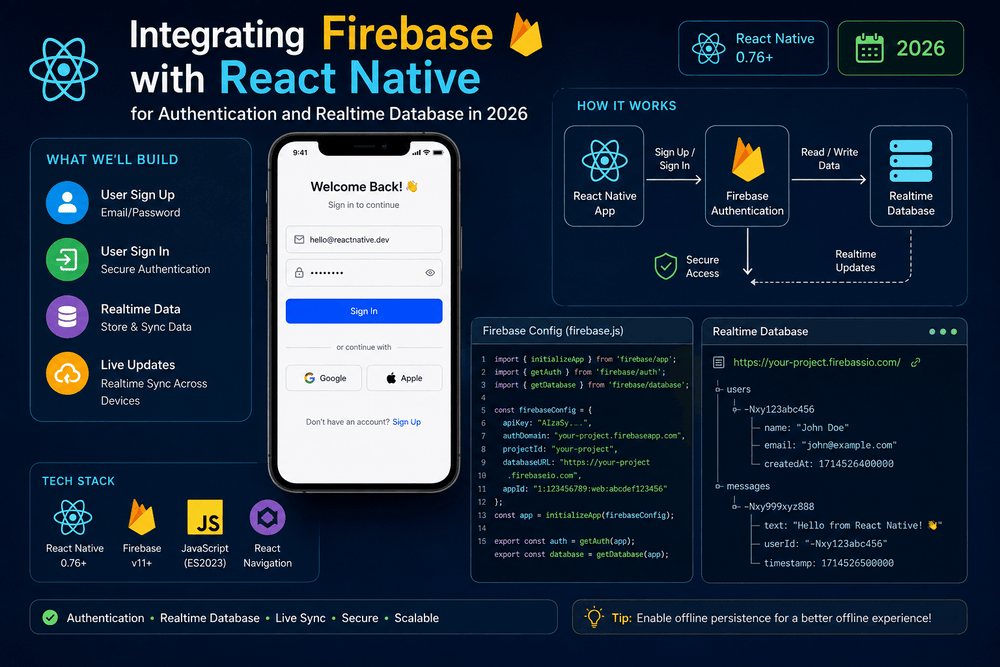
Integrating Firebase with React Native for Authentication and Realtime Database in 2026
Building a mobile application often requires more than creating attractive screens. Most modern apps need user accounts, secure authentication, cloud data storage, synchronization, and a reliable backend.
For React Native developers, Firebase can provide many of these capabilities without requiring you to build and maintain an entire backend infrastructure from scratch.
Firebase is Google’s application development platform and provides services such as Authentication, databases, analytics, storage, and other backend tools. Its Authentication service supports several sign-in methods, while Firebase Realtime Database provides synchronized data that can update across connected clients.
In this guide, we will explore how to integrate Firebase with React Native for Authentication and Realtime Database. You will learn how to create a Firebase project, configure a React Native application, authenticate users, write data, listen for realtime changes, and follow security best practices.
Why Use Firebase with React Native?
A mobile application typically needs a backend to manage information that should not exist only on the user’s device.
For example, imagine building a task management application.
A user might need to:
- Create an account
- Sign in securely
- Add tasks
- Update tasks
- Delete tasks
- Access tasks from multiple devices
- See changes without manually refreshing the screen
Building all of this from scratch could require a backend server, authentication system, database, API layer, security rules, and infrastructure.
Firebase provides many of these building blocks as managed services.
For React Native developers, this can significantly reduce the amount of backend infrastructure required for an application.
What Is Firebase Authentication?
Firebase Authentication provides authentication services for applications.
It supports multiple authentication methods, including:
- Email and password
- Phone authentication
- Google sign-in
- Apple sign-in
- Other supported identity providers
Firebase Authentication handles many of the difficult parts of account management, allowing developers to focus on the application’s user experience.
According to Google’s official Firebase documentation, Firebase Authentication provides backend services and SDKs for authenticating users and supports multiple sign-in providers.
For a React Native application, this means you can create login and registration screens while Firebase handles the underlying authentication process.
What Is Firebase Realtime Database?
Firebase Realtime Database is a cloud-hosted NoSQL database.
One of its most important characteristics is realtime synchronization.
When data changes in the database, connected clients can receive updates automatically.
For example:
User A
   ↓
Updates task
   ↓
Firebase Realtime Database
   ↓
User B receives updateThis can be useful for applications where information needs to appear quickly across multiple clients.
Common use cases include:
- Chat applications
- Collaborative applications
- Live dashboards
- Multiplayer features
- Notifications
- Shared lists
- Presence indicators
- Real-time activity feeds
Firebase’s official documentation explains that Realtime Database stores JSON data and synchronizes it in realtime to connected clients.
Firebase vs Firestore: Which Database Should You Use?
Firebase offers more than one database option.
Two commonly discussed choices are:
- Realtime Database
- Cloud Firestore
Realtime Database is based around a JSON tree and is particularly useful when realtime synchronization and simple data structures are central to the application.
Cloud Firestore provides a document-based data model and offers advanced querying and scalability features.
For this tutorial, we will focus specifically on Firebase Realtime Database because it is part of the requested React Native integration.
Before choosing a database for a production project, review Firebase’s official comparison and current documentation because database requirements vary considerably between applications.
Step 1: Create a Firebase Project
Start by opening the Firebase Console.
Create a new Firebase project and follow the setup instructions.
You will then have access to Firebase services associated with your project.
Next, add an application to the Firebase project.
For a React Native application, you may need to configure Android and iOS applications separately.
Firebase will provide configuration information that connects your mobile application to the correct Firebase project.
Important Security Note
Firebase configuration information that identifies your project is not the same thing as a traditional private server password.
However, this does not mean that Firebase security can be ignored.
Your database rules and authentication configuration are critical.
Never place private server credentials, service-account keys, or other sensitive secrets inside a React Native application.
Step 2: Install Firebase
If you are using a modern React Native application, install the Firebase JavaScript SDK:
```bash id="f9kq7s"
npm install firebase
Or with Yarn:
bash id="9m7w2a"
yarn add firebaseFirebase provides an official JavaScript SDK that can be used with supported application environments.
For React Native projects, make sure the Firebase APIs you select are compatible with your application's architecture and platform requirements.
Always check the current Firebase documentation before installing or upgrading packages because APIs and recommended integration methods can change over time.
---
# Step 3: Create a Firebase Configuration File
Create a file such as:
text id="j5x9k2"
src/
└── firebase/
└── config.tsYou can initialize Firebase with your project's configuration:tsx id="c4xq9w"<br>import { initializeApp } from 'firebase/app';const firebaseConfig = {<br>apiKey: 'YOUR_API_KEY',<br>authDomain: 'YOUR_PROJECT.firebaseapp.com',<br>databaseURL: 'YOUR_DATABASE_URL',<br>projectId: 'YOUR_PROJECT_ID',<br>storageBucket: 'YOUR_STORAGE_BUCKET',<br>messagingSenderId: 'YOUR_MESSAGING_SENDER_ID',<br>appId: 'YOUR_APP_ID',<br>};
const app = initializeApp(firebaseConfig);
export default app;Replace the placeholder values with the configuration associated with your Firebase project.
Firebase's official setup documentation explains how to register an application and initialize the Firebase SDK.
---
# Step 4: Configure Firebase Authentication
Go to the Firebase Console and open the Authentication section.
Enable the authentication providers you want your application to support.
For a beginner project, **Email/Password authentication** is a straightforward starting point.
After enabling it, you can create a registration function.
For example:
tsx id="p2e7sd"
import {
createUserWithEmailAndPassword,
getAuth,
} from 'firebase/auth';
const auth = getAuth();
async function registerUser(
email: string,
password: string
) {
const userCredential =
await createUserWithEmailAndPassword(
auth,
email,
password
);
return userCredential.user;
}This creates a Firebase Authentication account using the supplied credentials.
In a real application, you should also validate input and provide appropriate user-facing error messages.
---
# Step 5: Create a Login Function
The login process is similar.
tsx id="4h7y1k"
import {
getAuth,
signInWithEmailAndPassword,
} from 'firebase/auth';
const auth = getAuth();
async function loginUser(
email: string,
password: string
) {
const userCredential =
await signInWithEmailAndPassword(
auth,
email,
password
);
return userCredential.user;
}You can call this function when the user submits a login form.
A production application should handle errors carefully.
For example, you might display a general message such as:
> Unable to sign in. Please check your credentials and try again.
Avoid exposing unnecessary technical details to users.
Firebase provides authentication error information that developers can use to handle different scenarios appropriately.
---
# Step 6: Detect Authentication State
A mobile application often needs to know whether a user is currently authenticated.
Firebase provides an authentication state listener.
For example:tsx id="v3j6nd"<br>import { onAuthStateChanged } from 'firebase/auth';<br>onAuthStateChanged(auth, (user) => {<br>if (user) {<br>console.log('User is signed in:', user.uid);<br>} else {<br>console.log('No user is signed in.');<br>}<br>});In a React Native application, this logic is often placed inside an authentication provider or a dedicated authentication hook.
A common architecture looks like:text id="w6s1kq"<br>AuthProvider<br>↓<br>Authentication State<br>↓<br>App Navigation<br>↓<br>Authenticated ScreensWhen the user is signed in, the application can display the main application interface. When there is no authenticated user, it can display the login or registration screen. — # Step 7: Connect to Firebase Realtime Database Now that authentication is configured, you can integrate the Realtime Database. Import the database functions:
tsx id="k9r2xz"<br>import {<br>getDatabase,<br>ref,<br>set,<br>} from 'firebase/database';<br>const database = getDatabase();You can then write data using a database reference.
For example:tsx id="g7n4qm"<br>async function createProfile(<br>userId: string,<br>name: string<br>) {<br>await set(<br>ref(database, <code>users/${userId}</code>),<br>{<br>name,<br>createdAt: Date.now(),<br>}<br>);<br>}This creates a structure similar to:json<br>{<br>"users": {<br>"USER_ID": {<br>"name": "Example User",<br>"createdAt": 1700000000000<br>}<br>}<br>}The exact structure should be designed around your application's access patterns.
---
# Step 8: Read Data from the Realtime Database
Firebase provides APIs for reading data.
For a one-time read, you can use `get()`:tsx id="e2c7pq"<br>import {<br>get,<br>ref,<br>} from 'firebase/database';<br>async function getProfile(userId: string) {<br>const snapshot = await get(<br>ref(database, users/${userId})<br>);<br><br>if (snapshot.exists()) {<br>return snapshot.val();<br>}<br><br>return null;<br>}This is useful when you only need the current value.
However, some applications need continuous updates.
That is where realtime listeners become particularly useful.
---
# Step 9: Listen for Realtime Changes
The `onValue()` function can listen for changes to a database location.tsx id="d5r8yh"<br>import {<br>onValue,<br>ref,<br>} from 'firebase/database';<br>const profileRef = ref(<br>database,<br>users/${userId}<br>);<br><br>const unsubscribe = onValue(<br>profileRef,<br>(snapshot) => {<br>if (snapshot.exists()) {<br>console.log(snapshot.val());<br>}<br>}<br>);Whenever the data at that location changes, the listener can receive the updated information.
This is one of the most powerful features of **Firebase Realtime Database with React Native**.
---
# Step 10: Clean Up Realtime Listeners
Realtime listeners should not be created and forgotten.
If a React component subscribes to a Firebase database location, remove the listener when the component is no longer needed.
With React's `useEffect`, you can return the unsubscribe function:tsx id="r4k8tp"<br>useEffect(() => {<br>const profileRef = ref(<br>database,<br><code>users/${userId}</code><br>);
const unsubscribe = onValue(
profileRef,
(snapshot) => {
if (snapshot.exists()) {
setProfile(snapshot.val());
}
}
);
return unsubscribe;
}, [userId]);This is important because unnecessary active listeners can lead to extra work and unexpected application behavior.
Resource cleanup is an essential part of React Native development.
---
# Step 11: Secure Your Realtime Database
One of the most important parts of Firebase development is database security.
Never assume that your mobile application's interface protects your database.
The database itself must enforce access rules.
Firebase Realtime Database uses security rules to determine who can read and write data. Firebase's official documentation provides extensive guidance on authentication-based authorization and database rules.
For example, you may want users to access only their own profile.
A conceptual rule can look like:json<br>{<br>"rules": {<br>"users": {<br>"$uid": {<br>".read": "$uid === auth.uid",<br>".write": "$uid === auth.uid"<br>}<br>}<br>}<br>}This type of rule means that authenticated users can access only the database location associated with their own user ID.
Your actual production rules should be designed around your data model and application requirements.
---
# Step 12: Structure Your Firebase Data Carefully
Realtime Database stores data as a JSON tree.
A poorly designed structure can make queries and updates more complicated.
For example, avoid creating extremely deep structures when a flatter model would work better.
Instead of nesting everything under multiple levels, consider separating frequently accessed entities.
For example:json<br>{<br>"users": {},<br>"posts": {},<br>"comments": {},<br>"messages": {}<br>}The best structure depends on how your application reads and writes information.
Firebase's database documentation provides guidance on structuring data, indexing, and handling security rules.
---
# Common Mistakes When Using Firebase with React Native
## 1. Exposing Sensitive Credentials
Do not put private server credentials or service-account keys in your React Native application.
Remember that mobile application code can ultimately be inspected by users.
## 2. Weak Database Rules
Never leave a production database broadly readable or writable simply because it makes development easier.
Use Firebase Authentication and database security rules to control access.
## 3. Too Many Realtime Listeners
Only subscribe to the data your screen actually needs.
Unnecessary listeners can increase data synchronization and application work.
## 4. Poor Data Structure
Think about how your application will query data before creating your database structure.
## 5. Ignoring Error Handling
Network connections can fail.
Authentication can fail.
Database operations can fail.
A professional application should handle these situations gracefully rather than assuming every operation succeeds.
---
# Recommended React Native Firebase Project Structure
A simple application might use a structure like:text<br>src/<br>├── components/<br>├── screens/<br>├── hooks/<br>├── services/<br>│ ├── auth.ts<br>│ └── database.ts<br>├── firebase/<br>│ └── config.ts<br>├── navigation/<br>└── types/Keeping Firebase operations inside dedicated service files can make the application easier to test and maintain.
Instead of calling Firebase APIs directly from every screen, you can create reusable functions.
For example:tsx id="z8m1sv"<br>export async function getUserProfile(userId: string) {<br>// Firebase database logic<br>}Your screen can then focus on presentation and user interaction.
---
# Firebase Authentication and Realtime Database Best Practices
When building a production React Native application, follow these principles:
### Validate User Input
Check email formats, password requirements, and required fields before submitting requests.
### Protect Database Access
Use Firebase Authentication together with carefully designed Realtime Database rules.
### Keep Data Minimal
Do not store unnecessary information.
### Clean Up Listeners
Always unsubscribe from realtime listeners when they are no longer required.
### Handle Offline Scenarios
Mobile users frequently experience unstable network connections. Design the application so temporary connectivity problems do not create a confusing experience.
### Separate Firebase Logic
Keep authentication and database operations organized into reusable services or hooks.
### Monitor Your Application
Use appropriate monitoring and analytics tools to understand failures and performance issues in production.
---
# Firebase with React Native: When Is It a Good Choice?
Firebase can be a strong choice for applications that need:
* User authentication
* Realtime synchronization
* Cloud-hosted data
* Rapid development
* Managed backend infrastructure
* Cross-platform mobile support
It can be particularly useful for prototypes, startups, MVPs, chat applications, collaborative features, and applications where realtime updates are central.
However, Firebase is not automatically the best backend for every project.
Applications with highly specialized database requirements, complex server-side processing, or specific infrastructure constraints may benefit from other backend architectures.
The right technology depends on the project's requirements.
---
# Final Thoughts
**Integrating Firebase with React Native for Authentication and Realtime Database** provides developers with a practical way to add backend functionality to mobile applications without building every backend service from scratch.
Firebase Authentication can handle user identity and sign-in workflows, while Realtime Database can synchronize application data between connected clients.
The basic architecture is straightforward:text<br>React Native App<br>↓<br>Firebase Authentication<br>↓<br>Authenticated User<br>↓<br>Realtime Database<br>↓<br>Synchronized Application Data<br>```However, successful Firebase development requires more than simply connecting an SDK.
Security rules, database structure, authentication state, error handling, listener cleanup, and data access patterns all matter.
Start with a small project. Create registration and login screens, connect authentication, store a simple user profile, and then experiment with realtime updates.
Once you understand these fundamentals, you can build more sophisticated features such as chat systems, collaborative applications, live dashboards, and synchronized user data.
Most importantly, use the official Firebase and React Native documentation as your primary technical reference because APIs, SDK recommendations, and platform requirements evolve over time.
Frequently Asked Questions
Can Firebase be used with React Native?
Yes. Firebase provides services that can be integrated into React Native applications, including Authentication and Realtime Database.
Is Firebase Authentication secure?
Firebase Authentication provides managed authentication infrastructure, but application security also depends on correctly configuring authentication providers, database rules, authorization, and application architecture.
What is the difference between Firebase Realtime Database and Firestore?
Realtime Database uses a JSON tree and is designed around realtime synchronization. Cloud Firestore uses a document-based data model and provides different querying and scalability capabilities. Firebase recommends evaluating the requirements of your application before choosing between them.
Can React Native Firebase data update in real time?
Yes. Firebase Realtime Database provides listeners that can receive updates when data changes.
Should I use Firebase for every React Native app?
No. Firebase is a powerful option, but backend architecture should be selected based on your application’s requirements, data model, security needs, scalability expectations, and development resources.
Trusted Sources
- Firebase Authentication Documentation: https://firebase.google.com/docs/auth
- Firebase Realtime Database Documentation: https://firebase.google.com/docs/database
- Firebase Database Security: https://firebase.google.com/docs/database/security
- Firebase Data Structure Guide: https://firebase.google.com/docs/database/web/structure-data
- Firebase Database Comparison: https://firebase.google.com/docs/database/rtdb-vs-firestore
- React Native Official Documentation: https://reactnative.dev/
About The Author