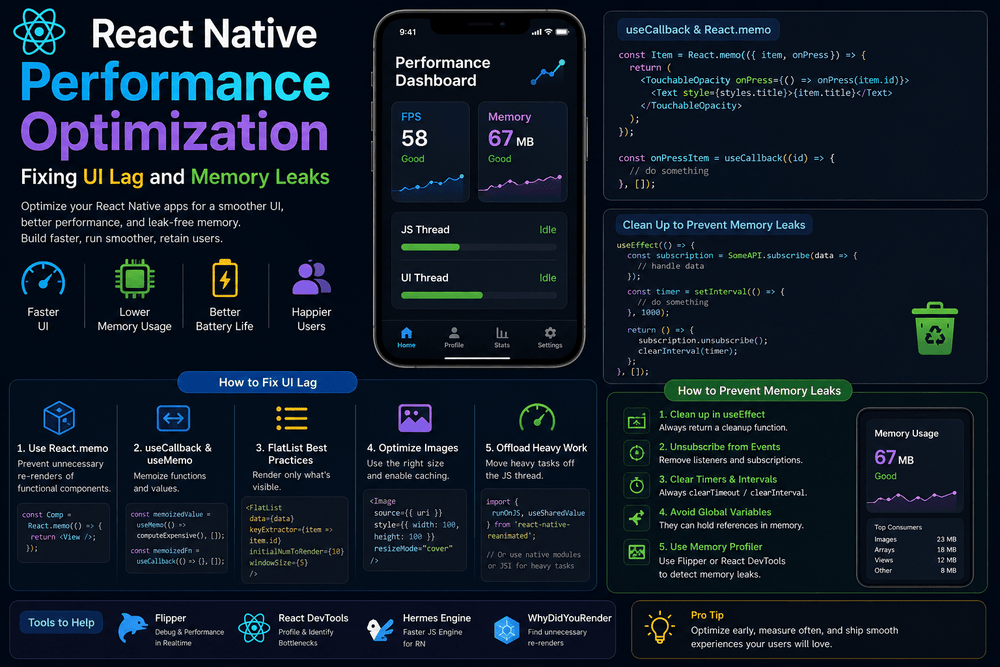
Learn React Native performance optimization techniques to fix UI lag, reduce memory usage, prevent memory leaks, optimize FlatList, and improve app performance.
A fast mobile application is not just about loading screens quickly. Users expect buttons to respond immediately, lists to scroll smoothly, animations to feel natural, and screens to remain stable even after using the application for a long time.
In React Native, performance problems can appear in several forms. You may notice delayed button presses, dropped animation frames, slow scrolling, excessive memory usage, unexpected crashes, or a screen that becomes progressively slower after repeated navigation.
These problems are often caused by inefficient rendering, expensive JavaScript operations, poorly optimized lists, large images, unnecessary state updates, or resources that are not properly cleaned up.
This guide explains practical React Native performance optimization techniques that can help you identify and fix UI lag, reduce unnecessary rendering, optimize large lists, manage memory more effectively, and prevent common memory leaks.
The goal is not to optimize every line of code. Instead, you will learn how to identify the parts of your application that actually create performance bottlenecks.
What Is React Native Performance Optimization?
React Native performance optimization is the process of improving how efficiently an application uses CPU, memory, rendering resources, network requests, and JavaScript execution.
A well-optimized application should provide:
- Smooth scrolling
- Responsive interactions
- Efficient screen rendering
- Stable memory usage
- Fast navigation
- Efficient image loading
- Minimal unnecessary re-renders
- Reliable animations
- Reasonable battery and CPU usage
Performance optimization should begin with measurement rather than assumptions.
If a screen feels slow, the first question should be:
What is actually causing the slowdown?
The problem might be JavaScript execution, rendering, image decoding, network requests, excessive component updates, or memory consumption.
Common React Native Performance Problems
Before changing your code, it helps to understand the symptoms you may encounter.
1. UI Lag
UI lag happens when the application cannot process and render updates quickly enough.
Typical symptoms include:
- Delayed button responses
- Stuttering animations
- Slow navigation transitions
- Jerky scrolling
- Inputs that feel delayed
- Temporary freezes
2. Slow FlatList Performance
Large lists can become expensive when every item renders unnecessarily or when too many components remain active.
3. Excessive Re-Renders
A component may render again even when the visible output has not meaningfully changed.
4. Memory Leaks
Memory leaks occur when resources remain referenced after they are no longer needed.
Possible sources include:
- Event listeners
- Timers
- Subscriptions
- WebSocket connections
- Long-running callbacks
- Incorrectly retained objects
5. Large Images
High-resolution images can consume significant memory, particularly when multiple images are displayed simultaneously.
6. Heavy JavaScript Work
Large loops, expensive calculations, data transformations, and excessive synchronous processing can block JavaScript execution.
How React Native Rendering Affects Performance
React Native applications contain several moving parts.
Your JavaScript code manages application logic and component rendering, while the underlying platform handles native functionality and visual rendering.
When JavaScript work becomes too expensive, the application can become less responsive.
For example:
const processLargeDataset = data => {
  return data
    .filter(item => item.active)
    .sort((a, b) => a.name.localeCompare(b.name))
    .map(item => ({
      ...item,
      formattedName: item.name.toUpperCase(),
    }));
};
Running an expensive operation repeatedly during rendering can cause unnecessary work.
Instead, identify whether the calculation really needs to happen every time the component renders.
1. Avoid Unnecessary Re-Renders
One of the most important React Native performance optimization techniques is reducing unnecessary component renders.
Consider:
function UserCard({ user }) {
  return (
    <View>
      <Text>{user.name}</Text>
    </View>
  );
}
If the parent component renders frequently, UserCard may also render again.
For components that receive the same props repeatedly, React.memo can sometimes prevent unnecessary renders.
import React from 'react';

const UserCard = React.memo(({ user }) => {
  return (
    <View>
      <Text>{user.name}</Text>
    </View>
  );
});

export default UserCard;
However, React.memo should not be added everywhere automatically.
If the component frequently receives new object or function references, memoization may provide little benefit.
The correct approach is to measure rendering behavior and optimize components that actually contribute to the problem.
2. Use useMemo for Expensive Calculations
If a calculation is expensive and its result does not need to be recreated on every render, useMemo can help.
For example:
const sortedProducts = useMemo(() => {
  return products
    .filter(product => product.available)
    .sort((a, b) => a.price - b.price);
}, [products]);
The calculation is recreated when products changes rather than on every render.
This can be useful for operations involving:
- Large arrays
- Complex filtering
- Sorting
- Data transformation
- Derived values
But useMemo also has a cost.
Do not use it simply because a value exists. For small calculations, normal JavaScript may be simpler and fast enough.
3. Use useCallback Carefully
Functions are recreated when a component renders.
For example:
const handlePress = () => {
  console.log('Pressed');
};
If a memoized child receives this function as a prop, the new function reference can cause the child to render again.
You can use useCallback when maintaining a stable function reference is actually useful:
const handlePress = useCallback(() => {
  console.log('Pressed');
}, []);
The important word is useful.
Using useCallback everywhere can make code harder to understand without producing a meaningful performance improvement.
Use it when:
- Passing callbacks to memoized children
- Working with expensive component trees
- Preventing unnecessary effect dependencies
- Profiling shows a render optimization opportunity
4. Optimize FlatList for Large Lists
One of the most common React Native performance problems occurs when displaying large lists.
Rendering hundreds or thousands of items at once is expensive.
Instead of using:
ScrollView
for a large dynamic dataset, prefer:
FlatList
Example:
<FlatList
  data={products}
  keyExtractor={item => item.id.toString()}
  renderItem={({ item }) => (
    <ProductCard product={item} />
  )}
/>
FlatList is designed for efficient rendering of long lists by rendering only the content needed around the visible area.
5. Keep FlatList Items Lightweight
Even with FlatList, each row should be reasonably lightweight.
Avoid putting unnecessary calculations inside renderItem.
Instead of:
renderItem={({ item }) => {
  const formattedPrice = calculateComplexPrice(item);

  return (
    <ProductCard
      product={item}
      price={formattedPrice}
    />
  );
}}
consider calculating derived data before rendering if appropriate, or memoizing expensive work.
You can also make list item components reusable and memoized when profiling shows that repeated rendering is a problem.
const ProductCard = React.memo(({ product }) => {
  return (
    <View>
      <Text>{product.name}</Text>
      <Text>{product.price}</Text>
    </View>
  );
});
6. Use Stable Keys
Keys help React identify list items.
Use a stable unique identifier:
keyExtractor={item => item.id.toString()}
Avoid using array indexes when the order of items can change.
For example:
keyExtractor={(item, index) => index.toString()}
can produce incorrect item identity when elements are inserted, removed, or reordered.
Stable keys improve both correctness and rendering behavior.
7. Avoid Anonymous Heavy Work Inside Render Functions
Rendering should remain as lightweight as reasonably possible.
Avoid doing expensive operations directly inside JSX:
<Text>
  {products
    .filter(product => product.available)
    .sort((a, b) => a.price - b.price)
    .map(product => product.name)
    .join(', ')}
</Text>
Instead, calculate derived values separately.
const availableProductNames = useMemo(() => {
  return products
    .filter(product => product.available)
    .sort((a, b) => a.price - b.price)
    .map(product => product.name)
    .join(', ');
}, [products]);
This makes the rendering code easier to understand and can prevent repeated expensive calculations.
8. Optimize Images
Images are frequently overlooked when investigating React Native performance.
A large image may consume considerably more memory than its displayed dimensions suggest.
For example, displaying a huge original photograph inside a small card is inefficient.
Better image practices include:
- Resize images before delivery
- Use appropriate image dimensions
- Compress images
- Avoid unnecessarily large assets
- Load images only when needed
- Use caching where appropriate
- Provide suitable thumbnails for lists
If a product card displays a 120 × 120 image, there is usually little reason to download an enormous original image when a smaller optimized version can be served.
Image optimization can improve both memory usage and network performance.
9. Avoid Loading Hundreds of Images at Once
Consider a product catalog containing hundreds of images.
Loading every image immediately can increase:
- Memory usage
- Network activity
- CPU work
- Image decoding
- Rendering cost
Use a virtualized list and load content as needed.
A practical architecture is:
API
 ↓
Paginated Data
 ↓
FlatList
 ↓
Visible Items
 ↓
Optimized Images
This prevents the application from attempting to display the entire dataset simultaneously.
10. Prevent Memory Leaks with useEffect Cleanup
Memory leaks are another important React Native performance concern.
Consider an event listener:
useEffect(() => {
  const handleResize = () => {
    // Handle event
  };

  someEventEmitter.addListener(
    'resize',
    handleResize
  );
}, []);
If the listener is not removed when the component unmounts, it can continue referencing the component’s logic.
The cleanup should remove it:
useEffect(() => {
  const subscription = someEventEmitter.addListener(
    'resize',
    handleResize
  );

  return () => {
    subscription.remove();
  };
}, []);
The exact cleanup API depends on the library you are using.
The principle is simple:
Every subscription should have a clear lifecycle.
11. Clean Up Timers
Timers can also cause unexpected work after a component disappears.
For example:
useEffect(() => {
  const timer = setInterval(() => {
    console.log('Running...');
  }, 1000);

  return () => {
    clearInterval(timer);
  };
}, []);
Without cleanup, the timer can continue executing after the component is no longer visible.
For one-time timers:
useEffect(() => {
  const timer = setTimeout(() => {
    console.log('Finished');
  }, 3000);

  return () => {
    clearTimeout(timer);
  };
}, []);
Always consider what happens when the user navigates away before the timer finishes.
12. Clean Up Network and WebSocket Connections
Applications using WebSockets, subscriptions, or real-time services need to manage their connection lifecycle carefully.
For example:
useEffect(() => {
  const socket = createSocket();

  socket.connect();

  return () => {
    socket.disconnect();
  };
}, []);
The exact implementation depends on the WebSocket library.
The important concept is that a screen should not leave unnecessary real-time connections running after the user has navigated away.
This can reduce:
- Memory usage
- Network traffic
- CPU activity
- Battery consumption
13. Avoid Updating State After It Is No Longer Needed
Asynchronous operations can create lifecycle problems.
For example, a component may start a network request and then unmount before the request finishes.
A robust application should consider cancellation or ignoring results that are no longer relevant.
Modern JavaScript APIs can use AbortController where the underlying request supports cancellation.
useEffect(() => {
  const controller = new AbortController();

  const loadData = async () => {
    try {
      const response = await fetch(
        'https://example.com/api/data',
        {
          signal: controller.signal,
        }
      );

      const data = await response.json();

      setData(data);
    } catch (error) {
      if (error.name !== 'AbortError') {
        console.error(error);
      }
    }
  };

  loadData();

  return () => {
    controller.abort();
  };
}, []);
This prevents an obsolete request from continuing unnecessarily when the component is no longer interested in its result.
14. Reduce Expensive JavaScript Work
JavaScript execution can become a performance bottleneck when the application performs expensive synchronous operations.
Examples include:
- Processing large JSON datasets
- Sorting huge arrays
- Complex filtering
- Parsing large files
- Performing repeated calculations
- Running expensive transformations during rendering
Instead of processing everything at once, consider:
- Pagination
- Incremental processing
- Memoization
- Server-side filtering
- Moving appropriate work away from the critical interaction path
For example, if an API returns 10,000 products but the screen only displays 20, consider whether the backend can provide pagination or filtering.
15. Avoid Unnecessary Global State Updates
Global state can make application architecture easier to manage, but updating a large shared store unnecessarily can cause many components to respond to changes.
For example, changing a small piece of state should not require an entire application tree to update.
Consider:
- Splitting state into logical domains
- Selecting only the data a component needs
- Avoiding unnecessary store updates
- Keeping local UI state local
The exact solution depends on the state-management library used by your application.
The goal is to minimize the number of components affected by each state change.
16. Optimize React Native Animations
Animations can expose performance problems quickly.
Avoid performing unnecessary JavaScript work during every animation frame.
When using an animation library, follow its recommended architecture for moving animation calculations away from expensive JavaScript execution when possible.
Keep animation callbacks lightweight.
For example, avoid doing large data transformations while an animation is actively running.
A smooth animation should have as little unrelated work competing for resources as possible.
17. Avoid Excessive Logging in Production
Logging is useful during development, but excessive logging can add unnecessary work.
For example:
console.log(largeObject);
inside a frequently executed callback can become expensive.
Avoid logging large objects repeatedly in:
- Scroll handlers
- Animation callbacks
- List rendering
- Frequent state updates
- High-frequency event listeners
Use logging intentionally while debugging and reduce unnecessary production logging.
18. Optimize API Requests
Not every performance problem originates in the user interface.
Slow API requests can make an application feel slow even when rendering itself is efficient.
Consider:
- Pagination
- Request caching
- Debouncing search requests
- Avoiding duplicate requests
- Fetching only required fields
- Compressing large responses
- Cancelling obsolete requests
For example, a search field should not necessarily send a request for every keystroke.
A debounce can reduce unnecessary network calls.
const searchProducts = debounce(query => {
  fetchProducts(query);
}, 300);
The implementation of debounce depends on your chosen utility or library.
19. Use Pagination Instead of Loading Everything
A common mistake is requesting an entire dataset when the user only needs a small portion.
Instead of:
GET /products
→ 50,000 products
prefer a paginated design when supported:
GET /products?page=1&limit=20
Then load additional data when the user approaches the end of the list.
This can improve:
- Initial loading time
- Memory usage
- Network consumption
- List rendering
- User experience
20. Measure Performance Before and After Optimization
Optimization without measurement can lead to unnecessary complexity.
Before changing your application, identify:
- Which screen is slow?
- Which component renders too often?
- Is JavaScript execution expensive?
- Is the list too large?
- Are images consuming excessive memory?
- Is a network request slow?
- Does memory usage increase after repeated navigation?
After making a change, measure again.
A useful optimization should produce an observable improvement.
How to Find Memory Leaks in React Native
Memory leaks are often difficult to identify by reading code alone.
A practical debugging process is:
Step 1: Reproduce the problem
Navigate repeatedly between the same screens.
For example:
Home
 ↓
Details
 ↓
Back
 ↓
Details
 ↓
Back
Repeat the process several times.
Step 2: Monitor memory
Observe whether memory usage grows continuously.
Step 3: Look for retained resources
Investigate:
- Event listeners
- Timers
- Subscriptions
- WebSockets
- Long-lived references
- Large caches
- Unreleased resources
Step 4: Inspect cleanup logic
Check every useEffect that creates a resource.
Ask:
What happens when this component unmounts?
If the answer is unclear, the lifecycle probably needs improvement.
A Practical Memory Leak Prevention Pattern
A good pattern is:
useEffect(() => {
  const subscription = subscribe();

  const timer = setInterval(() => {
    refreshData();
  }, 5000);

  return () => {
    subscription.remove();
    clearInterval(timer);
  };
}, []);
The effect creates two resources:
- A subscription
- A timer
The cleanup removes both.
This makes the lifecycle explicit and reduces the chance of resources continuing to run after the component is gone.
React Native Performance Checklist
Before releasing an application, review the following checklist.
Rendering
- Avoid unnecessary re-renders
- Use
React.memowhere profiling supports it - Keep component trees reasonably simple
- Avoid expensive calculations during render
Lists
- Prefer
FlatListfor large lists - Use stable keys
- Keep list items lightweight
- Avoid unnecessary item re-renders
- Use pagination for large datasets
Images
- Resize large images
- Compress assets
- Avoid loading unnecessary images
- Use optimized thumbnails
- Consider caching strategies
Memory
- Clean up subscriptions
- Remove event listeners
- Clear timers
- Disconnect sockets
- Cancel obsolete requests
- Avoid unbounded caches
Network
- Avoid duplicate requests
- Use pagination
- Debounce search
- Cache appropriate responses
- Cancel obsolete requests
JavaScript
- Avoid expensive synchronous work
- Memoize expensive calculations when appropriate
- Keep event handlers lightweight
- Avoid excessive logging
Testing
- Test long lists
- Test repeated navigation
- Test slow network conditions
- Test low-memory scenarios
- Profile before and after optimization
Frequently Asked Questions
Why is my React Native app lagging?
React Native UI lag can be caused by excessive JavaScript work, unnecessary re-renders, large lists, expensive calculations, unoptimized images, frequent state updates, or inefficient animations.
The best solution is to profile the application and identify the actual bottleneck rather than applying every optimization technique at once.
How can I improve React Native performance?
Start by measuring the application. Then optimize the areas responsible for the most work.
Common improvements include optimizing FlatList, reducing unnecessary re-renders, optimizing images, limiting expensive JavaScript operations, improving API requests, and cleaning up subscriptions and timers.
Does React.memo improve React Native performance?
It can.
React.memo can prevent a component from rendering when its props have not meaningfully changed. However, it is not automatically beneficial for every component.
Use profiling to determine whether memoization solves an actual rendering problem.
How do I prevent memory leaks in React Native?
Clean up resources created by components.
This includes:
- Event listeners
- Timers
- Subscriptions
- WebSocket connections
- Cancellable network requests
A common pattern is returning a cleanup function from useEffect.
Why is my FlatList scrolling slowly?
Slow FlatList performance can result from complex list items, unnecessary re-renders, large images, expensive calculations, or too much work being performed during scrolling.
Start by simplifying the item component and checking whether each row is rendering more often than necessary.
Should I use useMemo and useCallback everywhere?
No.
Both hooks have their own overhead and can make code more complicated.
Use them when they solve a demonstrated performance problem, especially around expensive calculations or stable references passed to memoized children.
Can large images cause React Native memory problems?
Yes.
Large images can consume significant memory, especially when many images are displayed simultaneously.
Use appropriately sized and optimized assets instead of loading unnecessarily large originals.
Is React Native performance different in development and production?
Yes.
Development builds often include additional debugging functionality and tooling that can affect performance.
Always evaluate production-like builds before making final performance conclusions.
Conclusion
Effective React Native performance optimization is not about adding useMemo, useCallback, or React.memo to every component.
The better approach is to identify the real bottleneck, measure its impact, make a targeted change, and measure again.
For UI lag, focus on rendering, JavaScript workload, lists, images, animations, and state updates.
For memory problems, pay particular attention to subscriptions, event listeners, timers, WebSockets, network requests, caches, and component lifecycle management.
Large lists should use virtualization and pagination where appropriate. Images should be optimized for their actual display size. Expensive calculations should not run repeatedly without a reason. Resources created by useEffect should have an appropriate cleanup strategy.
When these principles are applied consistently, React Native applications can become more responsive, stable, and efficient without sacrificing maintainability.
The most important performance rule is simple:
Measure first, optimize the real bottleneck, and verify the result.
About The Author