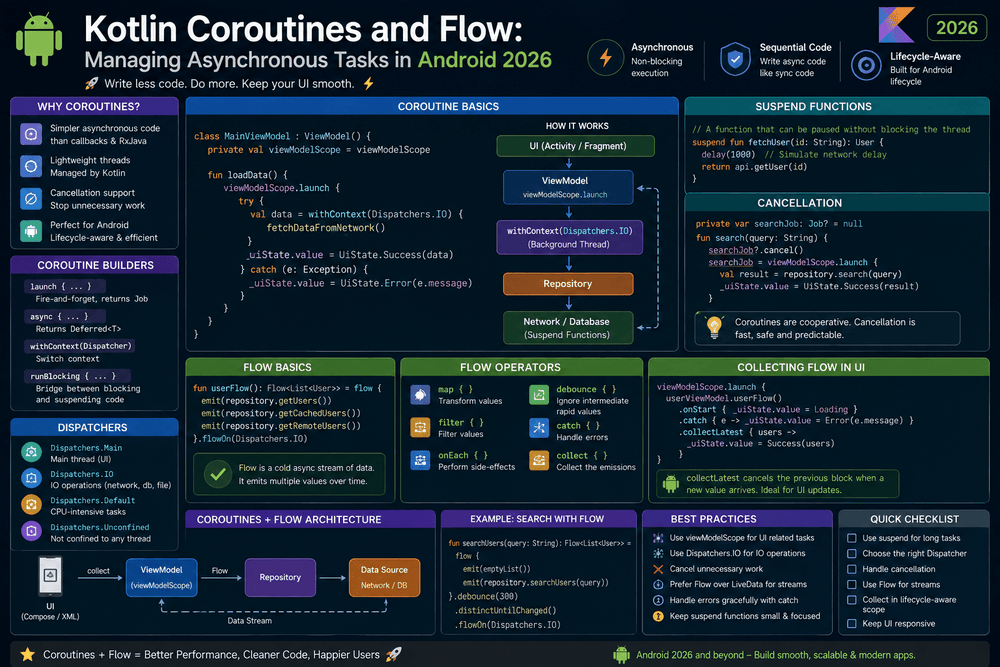
Kotlin Coroutines and Flow Managing Asynchronous Tasks in Android 2026
Kotlin Coroutines and Flow
Modern Android applications rarely perform all their work instantly. An app may need to download information from an API, read data from a local database, process files, respond to user actions, or continuously observe changing information. If these operations are handled incorrectly, the user interface can become slow, frozen, or frustrating to use.
This is where Kotlin Coroutines and Flow become especially useful.
Kotlin Coroutines provide a structured way to perform asynchronous and long-running operations without blocking the main thread. Kotlin Flow extends this approach by making it easier to work with streams of data that change over time. Together, they form an important part of modern Android development and work naturally with Android Jetpack components and Jetpack Compose.
Google’s Android documentation describes coroutines as the recommended solution for asynchronous programming on Android. Coroutines can simplify asynchronous code, support cancellation, and integrate with Jetpack libraries.
In this guide, we will explore how Kotlin Coroutines and Flow work, when to use them, and how they can help developers build responsive, maintainable Android applications.
What Are Kotlin Coroutines?
A coroutine is a lightweight unit of asynchronous work. Unlike traditional approaches that may require callbacks, threads, or complicated synchronization, coroutines allow asynchronous code to be written in a style that looks much closer to normal sequential code.
For example, an application might need to retrieve user information from a server:
suspend fun getUser(): User {
    return api.getUser()
}
The suspend keyword indicates that the function can suspend its execution while waiting for an operation to complete. It does not mean that a new thread is automatically created. Instead, the coroutine can suspend and later resume without blocking the thread unnecessarily.
Kotlin’s official documentation explains that suspending functions provide an abstraction for asynchronous operations, while the kotlinx.coroutines library supplies high-level tools such as launch and async.
This makes Kotlin Coroutines particularly useful for Android applications where keeping the main thread responsive is essential.
Why Asynchronous Programming Matters in Android
Android applications have a main thread responsible for important user-interface work. If developers perform expensive operations directly on this thread, the application can become unresponsive.
Imagine an app that downloads a large amount of data while the user is scrolling through a screen. If the network operation blocks the UI thread, animations may stop, buttons may become unresponsive, and the application may appear frozen.
Coroutines help solve this problem by allowing long-running operations to be suspended or moved to an appropriate dispatcher.
For example:
viewModelScope.launch {
    val result = repository.loadData()
    updateUi(result)
}
The code is straightforward, but the work can be structured so that the main thread is not blocked. Android’s documentation specifically recommends using coroutines to manage long-running tasks such as network requests and disk operations while keeping applications responsive.
Understanding suspend Functions
One of the most important concepts in Kotlin Coroutines is the suspend function.
A suspend function can pause its execution and resume later. For example:
suspend fun fetchProducts(): List<Product> {
    return api.getProducts()
}
A suspend function can be called from another suspend function or from a coroutine.
This approach makes asynchronous code easier to read because developers can describe a sequence of operations without nesting multiple callbacks.
For example:
viewModelScope.launch {
    val products = repository.fetchProducts()
    val filtered = products.filter { it.isAvailable }
    displayProducts(filtered)
}
Instead of creating several callback layers, the developer can describe the process in a logical sequence.
Coroutine Dispatchers in Android
Coroutines need an execution context, and Dispatchers help determine where work should run.
Common dispatchers include:
Dispatchers.Mainfor UI-related work.Dispatchers.IOfor input/output operations such as network and database work.Dispatchers.Defaultfor CPU-intensive processing.Dispatchers.Unconfinedfor specialized situations where the coroutine starts without a specific dispatcher.
A common example is:
suspend fun loadData(): Data {
    return withContext(Dispatchers.IO) {
        api.loadData()
    }
}
The withContext() function allows a coroutine to switch context for a particular operation. Android documentation recommends using the appropriate dispatcher for work that should not block the main thread.
For larger applications, Google’s current coroutine best practices also recommend injecting dispatchers rather than hardcoding them inside classes. This approach improves testability and makes application architecture more flexible.
What Is Kotlin Flow?
While a suspend function is useful when you need a result from a single asynchronous operation, many Android applications need to observe multiple values over time.
This is where Kotlin Flow becomes valuable.
A Flow represents an asynchronous stream of values. For example, an application could observe:
- Database changes
- User search input
- Download progress
- Authentication state
- Network status
- Sensor information
- UI state
The Kotlin documentation describes Flow as a sequential asynchronous data stream. Unlike a suspend function that normally produces one result, a Flow can emit multiple values over time.
A simple Flow might look like this:
val numbers = flow {
    emit(1)
    emit(2)
    emit(3)
}
The values can then be collected:
numbers.collect { number ->
    println(number)
}
This producer-and-consumer model is one of the reasons Kotlin Flow is useful for reactive Android applications.
Cold Flow vs. Hot Flow
Understanding the difference between cold and hot streams is essential when working with Kotlin Flow.
Cold Flow
A cold Flow does not begin producing values until it is collected. Each collector generally starts its own execution of the Flow.
For example:
val userFlow = flow {
    val user = api.getUser()
    emit(user)
}
The network request does not automatically happen simply because the Flow was created. Collection triggers the execution.
Kotlin’s official documentation describes cold flows as lazy: the flow builder’s code executes when a terminal operator such as collect() starts collection.
Hot Flow
Hot streams can emit values independently of individual collectors. Two important hot-flow types in modern Android development are StateFlow and SharedFlow.
StateFlow is particularly useful for representing current application or UI state, while SharedFlow is useful for broadcasting events or values to multiple subscribers.
StateFlow for Android UI State
StateFlow is commonly used in Android applications to expose observable state from a ViewModel.
For example:
private val _uiState = MutableStateFlow(UiState())
val uiState: StateFlow<UiState> = _uiState
The private MutableStateFlow can be modified by the ViewModel, while the public StateFlow can be observed by the UI.
This creates a clean separation between state ownership and state consumption.
With Jetpack Compose, a UI can collect the state and automatically react when it changes. The result is a reactive interface where the UI reflects the current application state rather than manually updating individual components.
Android’s documentation identifies StateFlow and SharedFlow as important tools for observable state and event streams.
SharedFlow for Events
SharedFlow is another hot stream that can be useful when multiple consumers need to observe emitted values.
For example, a ViewModel might expose application events:
private val _events = MutableSharedFlow<UiEvent>()
val events = _events.asSharedFlow()
The ViewModel can emit an event:
viewModelScope.launch {
    _events.emit(UiEvent.ShowMessage("Saved successfully"))
}
A UI component can collect those events and respond appropriately.
Developers should carefully distinguish persistent UI state from one-time events. StateFlow is generally more suitable for state that should always have a current value, while SharedFlow can be useful for shared event streams.
Flow Operators
Kotlin Flow provides many operators for transforming and controlling asynchronous data streams.
Some commonly used operators include:
map
Transforms each emitted value:
flowOf(1, 2, 3)
    .map { it * 2 }
filter
Allows only values matching a condition:
numbers.filter { it > 10 }
debounce
Useful for search fields where you do not want to send a network request for every keystroke:
searchFlow
    .debounce(300)
catch
Can be used to handle upstream exceptions:
flow {
    emit(api.getData())
}.catch { error ->
    // Handle error
}
flowOn
Changes the execution context of upstream Flow operations:
flow {
    emit(repository.loadData())
}.flowOn(Dispatchers.IO)
Kotlin documentation notes that flowOn() changes the context of the upstream portion of a Flow while preserving the downstream collector’s context.
Lifecycle-Aware Flow Collection
One of the most important considerations in Android development is the lifecycle of UI components.
A screen may become invisible while a coroutine is still collecting data. Continuing unnecessary work can waste resources and create unwanted behavior.
Android recommends lifecycle-aware collection patterns such as repeatOnLifecycle().
For example:
lifecycleScope.launch {
    repeatOnLifecycle(Lifecycle.State.STARTED) {
        viewModel.uiState.collect { state ->
            updateUi(state)
        }
    }
}
With this pattern, collection is active while the lifecycle is in the desired state and is cancelled when the lifecycle moves below that state. Android’s documentation specifically recommends this approach for collecting flows safely in UI components.
This is particularly important for applications with multiple screens, background operations, and continuously changing data.
Coroutines and ViewModel
The ViewModel is an ideal place for many UI-related coroutines because its lifecycle is longer than a typical Activity or Fragment recreation.
For example:
class ProductViewModel(
    private val repository: ProductRepository
) : ViewModel() {

    val products = repository.getProducts()
        .stateIn(
            scope = viewModelScope,
            started = SharingStarted.WhileSubscribed(5_000),
            initialValue = emptyList()
        )
}
This pattern allows the ViewModel to expose a state stream while keeping the data layer separate from the UI.
Android’s coroutine best practices recommend that data and business layers generally expose suspend functions for one-shot operations and Flow for ongoing data changes.
Kotlin Coroutines and Jetpack Compose
Jetpack Compose works naturally with Kotlin Coroutines and Flow.
For example, a Compose screen can collect state from a ViewModel and display the latest information.
A typical architecture might look like:
API / Database
      ↓
Repository
      ↓
ViewModel
      ↓
StateFlow
      ↓
Jetpack Compose UI
The repository handles data access, the ViewModel manages presentation-related state, and Compose observes the state.
This architecture reduces direct dependencies between UI components and data sources while making asynchronous operations easier to test and maintain.
Structured Concurrency
One of the major advantages of Kotlin Coroutines is structured concurrency.
Instead of launching background operations without clear ownership, coroutines are normally associated with a scope. When the scope is cancelled, child coroutines can also be cancelled.
For example:
viewModelScope.launch {
    repository.loadProducts()
}
When the ViewModel is cleared, its viewModelScope is cancelled. This helps prevent work from continuing after the component that started it is no longer needed.
Android highlights structured concurrency and built-in cancellation as important benefits of using coroutines.
Common Mistakes to Avoid
Although Kotlin Coroutines and Flow make asynchronous programming easier, developers can still misuse them.
1. Blocking the Main Thread
Avoid performing blocking operations directly on the UI thread.
Use an appropriate dispatcher and design APIs around suspend functions where appropriate.
2. Launching Uncontrolled Coroutines
Avoid creating global or unmanaged coroutine scopes simply to make code run in the background.
Prefer lifecycle-aware scopes such as viewModelScope and lifecycleScope when their ownership matches the task.
3. Ignoring Cancellation
Coroutine cancellation is an important part of structured concurrency. Long-running operations should cooperate with cancellation rather than assuming they must always continue.
4. Collecting Flows Without Considering Lifecycle
A Flow that continues collecting after a screen is no longer visible can consume unnecessary resources. Lifecycle-aware collection should be used for UI work.
5. Exposing Mutable State
Avoid exposing MutableStateFlow directly from a ViewModel when the UI should only observe state.
Prefer:
private val _state = MutableStateFlow(...)
val state = _state.asStateFlow()
This keeps mutation under the control of the ViewModel.
Best Practices for Kotlin Coroutines and Flow
For maintainable Android applications, developers should follow several practical principles:
- Keep the main thread responsive. Move suitable I/O and CPU-heavy operations away from the UI thread.
- Use structured concurrency. Give coroutines a clear owner and lifecycle.
- Prefer suspend functions for one-shot operations.
- Use Flow for ongoing streams of data.
- Use StateFlow for observable state.
- Use SharedFlow when a shared stream of events is appropriate.
- Collect UI flows according to the Android lifecycle.
- Inject dispatchers when building testable applications.
- Keep business and data logic outside UI components.
- Handle cancellation and exceptions deliberately.
These principles align closely with the current Android guidance for scalable and testable coroutine-based applications.
Final Thoughts
Kotlin Coroutines and Flow have changed the way developers approach asynchronous programming in Android. Coroutines make long-running operations easier to read and manage, while Flow provides a powerful model for handling streams of changing data.
The combination is especially useful in modern Android architectures built around ViewModel, Jetpack libraries, and Jetpack Compose. By using suspend functions for individual asynchronous tasks and Flow for continuous data streams, developers can create applications that are responsive, maintainable, and easier to test.
The most important lesson is not simply to learn individual coroutine functions. Developers should understand where asynchronous work belongs, who owns it, when it should be cancelled, and how data should move through the application.
When these principles are applied consistently, Kotlin Coroutines and Flow become more than convenient APIs. They provide a structured foundation for building reliable Android applications that can handle network requests, database updates, UI state, and other asynchronous tasks without turning the codebase into a collection of difficult-to-maintain callbacks.
Trusted Sources and Further Reading
- Android Developers — Kotlin Coroutines on Android
- Android Developers — Kotlin Coroutines Best Practices
- Android Developers — Kotlin Flows on Android
- Android Developers — StateFlow and SharedFlow
- Kotlin Documentation — Coroutines and Flow
- Kotlin Documentation — Coroutines Guide
About The Author