Integrating Room Database for Offline-First Android Applications: A Complete Guide 2026
Modern mobile applications are expected to work reliably even when an internet connection is slow, unstable, or completely unavailable. Users may travel through areas with poor connectivity, switch between Wi-Fi and mobile data, or simply want to access information that was previously downloaded.
This is why the offline-first Android application approach has become increasingly important.
Instead of treating the network as the only source of truth, an offline-first application can store important information locally and allow the user to continue working when connectivity disappears. When an internet connection becomes available again, the application can synchronize local and remote data.
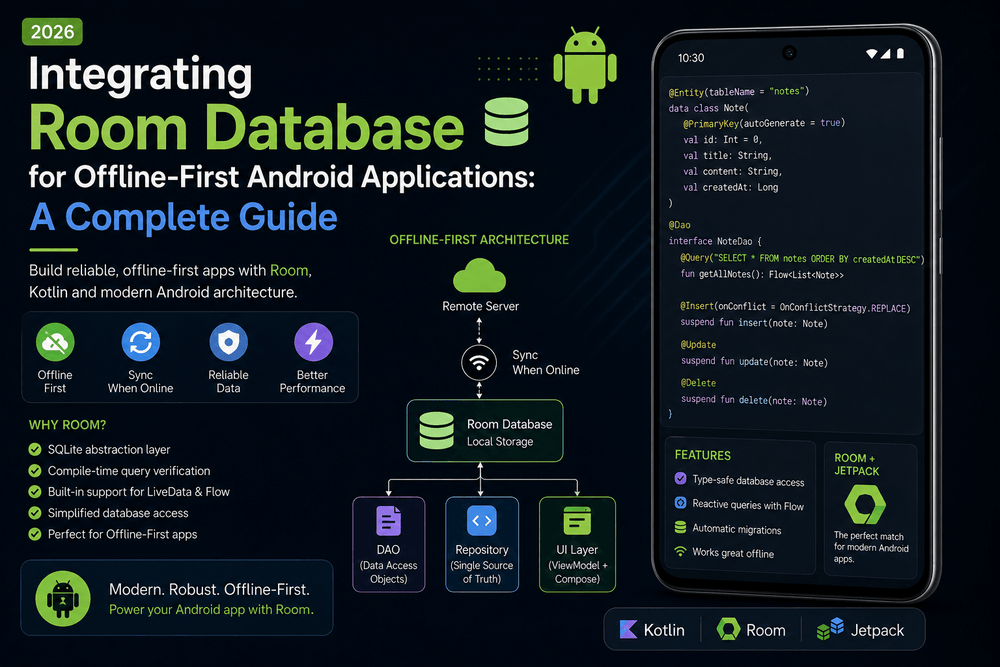
For Android developers, Room Database is one of the most useful tools for implementing this approach. Room is an abstraction layer over SQLite that provides compile-time verification of SQL queries, convenient database access, and integration with Android architecture components.
In this guide, we will explore how to integrate Room Database for offline-first Android applications, how its components work, how to design local data storage, and how to synchronize information with a remote API.
What Is an Offline-First Android Application?
An offline-first application is designed so that the user experience does not completely depend on an active internet connection.
Instead of this model:
UI
 ↓
Internet
 ↓
Server
an offline-first application can follow:
             UI
              ↓
          Repository
           ↙       ↘
       Room       Network
      Database      API
           ↘       ↙
        Synchronization
The local database provides information to the UI, while the network is used to retrieve new information and synchronize changes.
This approach has several advantages.
Better User Experience
Users can access previously downloaded information without waiting for a network request.
Improved Reliability
The application can continue functioning during temporary connectivity problems.
Faster UI
Reading from a local database can be faster and more predictable than waiting for a remote API.
Reduced Network Usage
Frequently requested information can be served from local storage rather than downloaded repeatedly.
Why Use Room Database on Android?
Android applications can technically use SQLite directly, but Room provides a higher-level abstraction that makes database development more convenient.
Room offers three major components:
- Entity
- DAO
- Database
These components work together to provide structured local persistence.
Android’s official documentation describes Room as a persistence library that provides an abstraction layer over SQLite and is recommended for applications that need structured local database storage.
Understanding Room Entities
An Entity represents a table in the Room database.
For example, suppose an application stores articles.
@Entity
data class Article(
    @PrimaryKey
    val id: Long,
    val title: String,
    val content: String,
    val updatedAt: Long
)
The @Entity annotation tells Room that the class represents a database table.
The @PrimaryKey identifies the unique key for each record.
The resulting table can conceptually look like:
Article
--------------------------------
id
title
content
updatedAt
Entities should represent the data your application actually needs locally.
Avoid storing large amounts of unnecessary information simply because the API provides it.
Understanding Room DAOs
A Data Access Object (DAO) defines the operations that can be performed on the database.
For example:
@Dao
interface ArticleDao {

    @Query("SELECT * FROM Article")
    fun observeArticles(): Flow<List<Article>>

    @Insert(onConflict = OnConflictStrategy.REPLACE)
    suspend fun insertArticles(
        articles: List<Article>
    )

    @Query("DELETE FROM Article")
    suspend fun deleteAll()
}
The DAO separates SQL queries from the rest of the application.
The UI does not need to know how SQL queries are written.
The repository can simply request data through the DAO.
This separation is especially useful when implementing an offline-first architecture.
Creating the Room Database
The database class connects Room entities and DAOs.
For example:
@Database(
    entities = [Article::class],
    version = 1
)
abstract class AppDatabase : RoomDatabase() {

    abstract fun articleDao(): ArticleDao
}
The database can then be created using Room’s database builder.
val database = Room.databaseBuilder(
    context,
    AppDatabase::class.java,
    "app_database"
).build()
For a production application, database creation is usually managed through dependency injection rather than constructing the database directly in an Activity.
Room and Repository Architecture
A strong offline-first application should avoid allowing the UI to communicate directly with Room.
Instead, use a repository.
A typical architecture looks like:
             UI
              ↓
          ViewModel
              ↓
          Repository
          ↙       ↘
      Room        API
     Database    Service
The repository becomes the central place for deciding where data should come from.
For example:
class ArticleRepository(
    private val dao: ArticleDao,
    private val api: ArticleApi
)
The ViewModel does not need to know whether information came from Room or the network.
This creates a cleaner separation of concerns.
The Local Database as the Source of Truth
One of the most important principles of offline-first architecture is establishing a single source of truth.
In many applications, the local database becomes the source of truth for UI data.
The flow can look like:
Remote API
↓
Repository
↓
Room Database
↓
Flow
↓
ViewModel
↓
UI
When new information arrives from the server, the repository updates Room.
The UI observes Room.
This means the UI does not need to manage two separate versions of the same data.
Instead, the database becomes the central local representation.
Using Room with Kotlin Flow
Room integrates naturally with Kotlin Flow.
For example:
@Query("SELECT * FROM Article ORDER BY updatedAt DESC")
fun observeArticles(): Flow<List<Article>>
Whenever the underlying table changes, Room can emit updated data through the Flow.
A ViewModel can expose that stream to the UI.
class ArticleViewModel(
private val repository: ArticleRepository
) : ViewModel() {
val articles = repository.observeArticles()
}
With this design, the UI reacts to database changes automatically.
This is particularly useful for offline-first applications because the UI can display locally stored data immediately.
Loading Local Data Before the Network
A common offline-first pattern is:
- Read data from Room.
- Display it to the user.
- Request fresh data from the server.
- Save the server response into Room.
- Allow Room to update the UI.
Conceptually:
Application starts
↓
Read Room
↓
Display cached data
↓
Request API data
↓
Receive response
↓
Update Room
↓
UI receives updated data
This can make the application feel much faster.
The user does not necessarily have to wait for the network before seeing something useful.
Implementing a Simple Offline-First Repository
A simplified repository might look like:
class ArticleRepository(
    private val dao: ArticleDao,
    private val api: ArticleApi
) {
fun observeArticles(): Flow<List<Article>> {
return dao.observeArticles()
}
suspend fun refreshArticles() {
val remoteArticles = api.getArticles()
dao.insertArticles(remoteArticles)
}
}
The UI observes the database:
Room → Flow → ViewModel → UI
The refresh operation updates Room:
API → Repository → Room → Flow → UI
This architecture creates a predictable data flow.
Handling Network Failures
An offline-first application should expect network failures rather than treating them as exceptional situations.
For example:
suspend fun refreshArticles() {
    try {
        val articles = api.getArticles()
        dao.insertArticles(articles)
    } catch (exception: IOException) {
        // Keep using local data
    }
}
If the API is unavailable, the existing Room data can continue to provide information to the user.
The application might display a small message such as:
“You’re offline. Showing saved articles.”
This is generally better than replacing the entire screen with an error message when useful local data is available.
Synchronizing Local and Remote Data
Synchronization becomes more complicated when users can modify data offline.
Imagine a note-taking application.
A user edits a note while offline.
The application needs to:
- Save the change locally.
- Mark the change as pending synchronization.
- Wait for connectivity.
- Send the change to the server.
- Confirm the server response.
- Mark the local record as synchronized.
A local entity might contain:
@Entity
data class Note(
    @PrimaryKey
    val id: Long,
    val text: String,
    val syncState: SyncState
)
The exact synchronization strategy depends on the application.
For simple read-only content, synchronization may be straightforward.
For collaborative editing or offline writes, conflict resolution becomes much more important.
Handling Data Conflicts
Suppose a user changes an item offline while the same item is changed on the server.
Which version should win?
Possible strategies include:
- Server wins
- Client wins
- Last-write-wins
- Version-based conflict resolution
- Manual conflict resolution
There is no universal solution.
The correct strategy depends on the business requirements.
For critical data, developers should avoid silently overwriting user changes without considering conflicts.
A robust synchronization system may use timestamps, version numbers, operation IDs, or server-side conflict-resolution logic.
Room Database Migrations
As an application evolves, its database schema will probably change.
For example, version 1 may contain:
Article
- id
- title
Later, version 2 may add:
Article
- id
- title
- author
Room supports database migrations to move existing databases from one schema version to another.
A migration might look like:
val MIGRATION_1_2 = object : Migration(1, 2) {

    override fun migrate(db: SupportSQLiteDatabase) {
        db.execSQL(
            "ALTER TABLE Article ADD COLUMN author TEXT"
        )
    }
}
Then the migration can be registered with the database builder.
Database migrations should be tested carefully.
A migration that works on a fresh installation may still fail for users who have several older database versions.
Testing Room Databases
Database testing is important because local persistence is part of the application’s functionality.
Useful tests include:
- Insert operations
- Update operations
- Delete operations
- Query results
- Sorting
- Filtering
- Relationships
- Database migrations
- Conflict handling
Android documentation recommends testing Room database implementations and provides guidance for testing database behavior.
Testing helps detect problems before they affect users with existing local data.
Room and Dependency Injection
Room works well with dependency injection frameworks such as Hilt.
For example:
@Module
@InstallIn(SingletonComponent::class)
object DatabaseModule {

    @Provides
    @Singleton
    fun provideDatabase(
        application: Application
    ): AppDatabase {
        return Room.databaseBuilder(
            application,
            AppDatabase::class.java,
            "app_database"
        ).build()
    }

    @Provides
    fun provideArticleDao(
        database: AppDatabase
    ): ArticleDao {
        return database.articleDao()
    }
}
The repository can then receive the DAO through constructor injection.
class ArticleRepository @Inject constructor(
    private val dao: ArticleDao,
    private val api: ArticleApi
)
This reduces manual object creation and makes dependencies easier to test.
Offline-First UI States
An offline-first UI should distinguish between several possible situations.
For example:
Loading local data
       ↓
Local data available
       ↓
Refreshing from server
       ↓
Updated local data
The UI might display:
- Existing cached content
- A refresh indicator
- An offline indicator
- An error message only when appropriate
This provides a smoother experience than treating every network request as a blocking operation.
Room Performance Best Practices
Room is powerful, but database queries still need to be designed carefully.
Avoid Loading Huge Datasets
Do not query thousands of records if the UI only needs the first 20.
Use pagination when appropriate.
Add Proper Indexes
Indexes can improve query performance for frequently searched columns.
Avoid Heavy Work on the Main Thread
Database operations should be performed using appropriate asynchronous APIs.
Select Only Required Columns
If a screen only needs a few fields, avoid unnecessarily loading large objects.
Use Transactions When Necessary
Multiple related database operations may need to be performed atomically.
Room supports transactions for maintaining consistency.
Pagination with Room
Applications such as news feeds, shopping platforms, and social networks may contain thousands of records.
Loading everything into memory is inefficient.
Room integrates with the Paging library, allowing applications to load data incrementally.
A simplified architecture can look like:
Remote API
     ↓
Repository
     ↓
Room
     ↓
Paging
     ↓
ViewModel
     ↓
UI
Instead of downloading and displaying everything at once, the application loads content in manageable portions.
This improves memory usage and can provide smoother scrolling.
Common Offline-First Mistakes
Treating the API as the Only Source of Truth
If the UI always waits for the network, the application is not truly offline-first.
Storing Everything Locally
Offline-first does not mean copying the entire server database to the device.
Store the information that provides real user value.
Ignoring Synchronization Conflicts
Offline writes require a strategy for handling conflicting changes.
Forgetting Database Migrations
Users may have databases created by older application versions.
Always test schema upgrades.
Exposing Room Directly to the UI
The UI should generally communicate through ViewModels and repositories rather than directly querying the database.
Performing Large Queries Without Pagination
Large datasets can cause memory and performance problems.
Use appropriate pagination strategies when necessary.
A Recommended Offline-First Android Architecture
A scalable architecture might look like this:
                UI
                 ↓
              ViewModel
                 ↓
             Repository
            ↙          ↘
        Local            Remote
        Room              API
         ↓                 ↓
       Cache          Network Data
            ↘          ↙
          Synchronization
The key principle is that the UI consumes a reliable local representation of application data.
The network updates that representation when new information becomes available.
This makes the application less dependent on network availability.
Step-by-Step Implementation Strategy
If you are adding Room to an existing Android application, consider the following process:
Step 1: Identify Important Data
Determine which information users should be able to access offline.
Step 2: Design Entities
Create Room entities that represent the local data model.
Step 3: Create DAOs
Define queries and database operations.
Step 4: Create the Room Database
Configure the database and entities.
Step 5: Introduce a Repository
Use the repository as the central data-access layer.
Step 6: Expose Local Data
Use Flow or another observable mechanism to expose database changes.
Step 7: Connect the ViewModel
Allow the ViewModel to expose application state to the UI.
Step 8: Add Network Synchronization
Fetch remote data and update the local database.
Step 9: Handle Failures
Design appropriate behavior for offline and error conditions.
Step 10: Test Migrations and Synchronization
Test both new installations and existing databases.
Integrating Room Database for offline-first Android applications can significantly improve reliability, performance, and user experience.
Room provides a structured way to store application data locally while working naturally with Kotlin, Flow, ViewModel, and modern Android architecture.
The most important principle is to avoid treating offline support as an afterthought. Instead, design the data flow around a reliable local source of truth and use the network to synchronize information when connectivity is available.
A well-designed offline-first architecture can allow users to read previously loaded content, continue working without an internet connection, and receive updated information when the network returns.
Room is not simply a replacement for SQLite. Used correctly, it becomes an important part of a larger architecture that combines local persistence, repositories, ViewModels, Kotlin Flow, network synchronization, and lifecycle-aware UI.
For developers building modern Android applications, understanding Room entities, DAOs, database migrations, Flow integration, caching strategies, and synchronization patterns is an important step toward creating applications that remain useful even when connectivity is unreliable.
The best offline-first applications do not make users think about whether they are online or offline. They simply continue to work.
Trusted Sources and Further Reading
- Android Developers — Save Data in a Local Database Using Room: Official documentation covering Room Database, entities, DAOs, queries, and database configuration.
https://developer.android.com/training/data-storage/room - Android Developers — Room Database Testing: Official guidance for testing Room databases and database operations.
https://developer.android.com/training/data-storage/room/testing-db - Android Developers — Offline-First Data Layer: Official guidance on designing offline-first applications and local data sources.
https://developer.android.com/topic/architecture/data-layer/offline-first - Android Developers — Paging with Room: Official documentation for integrating Room with the Paging library.
https://developer.android.com/topic/libraries/architecture/paging/v3-network-db - Android Developers — Kotlin Flow: Official documentation for working with asynchronous streams in Android applications.
https://developer.android.com/kotlin/flow - Android Developers — Guide to App Architecture: Official recommendations for building scalable and maintainable Android applications.
https://developer.android.com/topic/architecture
About The Author