How to Secure User Data and Store Credentials Safely on Android 2026
Security is no longer an optional feature in modern Android development. Mobile applications regularly handle sensitive information such as passwords, authentication tokens, personal details, payment-related data, API credentials, and private files. If this information is stored incorrectly, attackers may be able to access it through reverse engineering, compromised devices, insecure storage, application vulnerabilities, or accidental data leaks.
For Android developers, secure data storage is therefore an essential part of application architecture. The goal is not simply to encrypt everything, but to understand what information truly needs to be stored, where it should be stored, how long it should remain available, and which Android security APIs are appropriate.
Android provides several security mechanisms, including the Android Keystore system, platform authentication, private application storage, and modern credential-management APIs. OWASP’s Mobile Application Security Verification Standard also treats secure storage, authentication, cryptography, and data leakage prevention as important areas of mobile application security.
This guide explains practical ways to secure user data and store credentials safely on Android, with examples and best practices that developers can apply to modern Kotlin applications.
Why Secure Data Storage Matters on Android
Applications often need to store information locally so users do not have to log in repeatedly or download the same data every time the application starts.
For example, an application may store:
- Authentication tokens
- User preferences
- Session information
- Personally identifiable information
- Encryption keys
- API credentials
- Cached application data
- Private documents
- Authentication-related metadata
The problem is that storing sensitive information creates another security boundary that developers must protect.
OWASP explains that sensitive mobile data can be exposed through inappropriate storage locations, backups, logs, external storage, or weak cryptographic controls. A stolen authentication token, for example, may potentially allow an attacker to take over a user’s session.
A good security strategy therefore starts with a simple question:
Do I really need to store this information locally?
If the answer is no, do not store it.
Reducing the amount of sensitive information stored on a device is one of the simplest ways to reduce the application’s attack surface.
Understand the Difference Between Data and Credentials
Before choosing a storage solution, separate ordinary application data from security-sensitive credentials.
Normal application data might include:
- Theme preferences
- Language selection
- UI settings
- Recently selected filters
Credentials and secrets are different. They may include:
- Passwords
- Access tokens
- Refresh tokens
- Private cryptographic keys
- API secrets
- Authentication certificates
These should receive stronger protection.
For example, storing a simple boolean such as dark_mode=true does not require the same security strategy as storing an OAuth refresh token.
This distinction helps developers avoid both extremes: unnecessarily complicated security for harmless data and dangerously weak protection for sensitive information.
Never Hardcode Passwords or Encryption Keys
One of the most important Android security rules is simple:
Never put sensitive secrets directly inside your application source code.
A developer might be tempted to write:
const val API_SECRET = "my-super-secret-key"
This does not make the secret secure.
An Android application distributed to users can be inspected and reverse-engineered. Android’s official security guidance warns that hardcoded cryptographic secrets can be retrieved using reverse-engineering techniques.
Hardcoded secrets may also accidentally enter:
- Git repositories
- Public GitHub projects
- Build logs
- Screenshots
- Debug builds
- Shared code examples
Android recommends keeping API keys and similar secrets out of source control and using appropriate secret-management techniques for development and production environments.
Even obfuscating a hardcoded secret is not a complete solution. If the application needs the secret, a determined attacker may eventually be able to extract it.
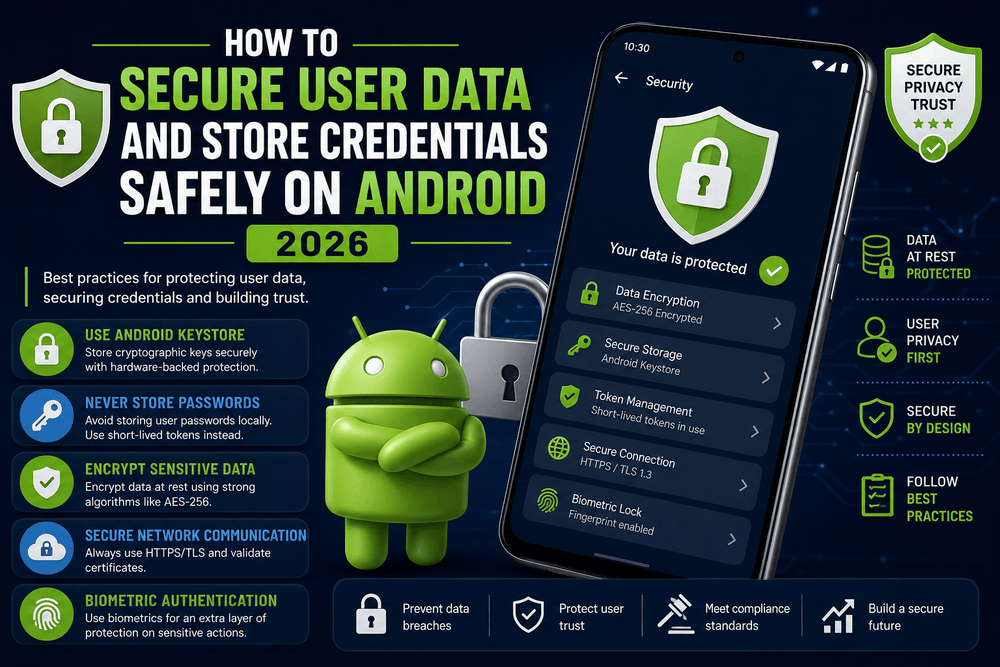
Use Android Keystore for Cryptographic Keys
The Android Keystore system is one of the most important tools for secure Android credential storage.
Android Keystore allows applications to create and use cryptographic keys while making the key material difficult to extract. Android documentation explains that key material can remain non-exportable and that developers can restrict how and when keys are used.
A simplified example of generating an AES key looks like this:
val keyGenerator = KeyGenerator.getInstance(
    KeyProperties.KEY_ALGORITHM_AES,
    "AndroidKeyStore"
)

keyGenerator.init(
    KeyGenParameterSpec.Builder(
        "app_encryption_key",
        KeyProperties.PURPOSE_ENCRYPT or
            KeyProperties.PURPOSE_DECRYPT
    )
        .setBlockModes(KeyProperties.BLOCK_MODE_GCM)
        .setEncryptionPaddings(
            KeyProperties.ENCRYPTION_PADDING_NONE
        )
        .build()
)

val secretKey = keyGenerator.generateKey()
The important idea is that the encryption key is managed by the Keystore rather than being stored as an ordinary string in your application files.
Modern Android devices may also provide hardware-backed Keystore implementations. Depending on the device, cryptographic keys can be protected using components such as a Trusted Execution Environment or Secure Element.
Encrypt Sensitive Data at Rest
Android application security involves protecting information both in transit and at rest.
Data at rest is information stored locally on the device.
If your application has a legitimate reason to keep sensitive information locally, consider encrypting it using strong, modern cryptographic primitives and keeping the encryption key separate from the encrypted data.
For example, conceptually:
Sensitive data
      ↓
Encryption
      ↓
Encrypted data → Application storage

Encryption key → Android Keystore
This architecture is significantly stronger than storing both the plaintext data and its encryption key in the same ordinary preferences file.
OWASP recommends strong key-management practices and places hardware-backed Android Keystore among the preferred options for cryptographic key storage where supported.
Be Careful With SharedPreferences
SharedPreferences is convenient and useful for simple application settings, but developers should not automatically treat it as a secure vault.
For example, this is perfectly reasonable for a non-sensitive preference:
val preferences =
    context.getSharedPreferences(
        "app_settings",
        Context.MODE_PRIVATE
    )

preferences.edit()
    .putBoolean("dark_mode", true)
    .apply()
However, storing passwords or cryptographic keys directly in ordinary preferences is not a strong security architecture.
OWASP specifically warns against storing cryptographic keys directly in SharedPreferences and recommends stronger approaches for protecting sensitive key material.
There is an important distinction here:
Private application storage is not automatically equivalent to encrypted storage.
Developers should determine whether the information requires encryption rather than assuming that placing it inside an application-private directory is sufficient.
What About EncryptedSharedPreferences?
Many Android developers have used EncryptedSharedPreferences as a convenient solution for encrypted preference data.
However, the current security landscape has changed. OWASP notes that the AndroidX Security Crypto library, including EncryptedSharedPreferences and EncryptedFile, has been deprecated, while an official replacement has not yet been released.
This means developers should avoid blindly copying older tutorials.
When starting a new project, check the current Android documentation and AndroidX release information before selecting a security-storage library. Security APIs evolve, and recommendations that were common several years ago may no longer represent the preferred architecture.
Never Store Passwords in Plain Text
If your application operates its own authentication backend, the safest architecture is generally not to store the user’s actual password on the Android device.
Instead, authentication should normally happen against a secure remote service.
The application can receive an authentication result such as a short-lived access token and, when necessary, a refresh mechanism according to the backend’s security architecture.
Passwords should be handled by the authentication system rather than saved locally for convenience.
OWASP emphasizes that authentication and authorization must be securely enforced by the remote endpoint when an application communicates with a backend service.
A mobile application should not be considered the final authority for deciding whether a user has permission to access protected server resources.
Consider Credential Manager for Modern Sign-In
Modern Android applications can also use Credential Manager to provide a consistent interface for authentication methods such as passwords, passkeys, and federated sign-in solutions.
Android describes Credential Manager as an API for handling multiple sign-in methods and interacting with credential providers.
This can be preferable to designing a custom credential-storage system from scratch.
Instead of creating your own mechanism for storing and managing every login credential, you can use platform-supported authentication technologies where appropriate.
Passkeys are particularly important in modern authentication because they can reduce dependence on traditional passwords while using public-key cryptography.
Protect Authentication Tokens
Access and refresh tokens deserve special attention.
An authentication token should be treated as sensitive information because possession of a valid token may allow access to protected resources.
A sensible architecture might look like:
User
  ↓
Secure authentication
  ↓
Backend
  ↓
Access token
  ↓
Android application
  ↓
Protected local storage / secure key architecture
Avoid placing tokens in:
- Logs
- Analytics events
- Crash reports
- URLs
- Public external storage
- Debug messages
- Screenshots
- Hardcoded constants
OWASP specifically identifies authentication tokens as sensitive information that can create account-takeover risks if exposed.
Also consider token expiration and server-side revocation. Secure storage alone cannot compensate for an authentication architecture that never expires or invalidates compromised credentials.
Avoid External Storage for Sensitive Information
Android supports external and shared storage for legitimate use cases such as user-generated media and documents.
However, sensitive application data should generally not be placed in public or broadly accessible locations.
OWASP warns that external storage can expose sensitive information and recommends avoiding it for sensitive data.
If your application needs to save a document that contains private information, carefully consider:
- Whether it needs to be stored at all.
- Whether it belongs in private application storage.
- Whether it needs encryption.
- Whether the user intentionally requested that it be exported.
- Whether other applications should be able to access it.
The correct storage location depends on the data’s purpose and sensitivity.
Protect Data During Network Communication
Secure local storage is only one part of Android application security.
Sensitive information traveling between an Android application and a backend should be protected using secure network protocols, normally HTTPS with properly configured TLS.
Avoid sending passwords, tokens, or private information through unencrypted HTTP connections.
You should also validate certificates and follow current Android and backend security recommendations rather than implementing custom cryptographic networking.
The OWASP Mobile Application Security Verification Standard includes secure network communication as a dedicated security category alongside storage and authentication.
In other words:
Encrypting local storage does not help if sensitive information is transmitted insecurely.
Use Biometric Authentication for Sensitive Actions
Biometric authentication can provide an additional layer of protection for sensitive application operations.
Examples include:
- Viewing financial information
- Revealing sensitive documents
- Approving a transaction
- Accessing protected application settings
- Performing a high-risk account action
Android supports biometric authentication and device credential mechanisms for local authentication. OWASP recommends implementing local authentication according to platform security best practices.
For particularly sensitive operations, consider requiring authentication immediately before the operation rather than relying only on the fact that the user opened the application several minutes earlier.
Do Not Put Sensitive Data in Logs
Debug logging is extremely useful during development, but careless logging can expose private information.
Avoid statements such as:
Log.d("Auth", "Access token: $accessToken")
Even if you remove the log before release, sensitive information may still appear during testing, QA, crash collection, or shared development environments.
Do not log:
- Passwords
- Access tokens
- Refresh tokens
- Private keys
- Authentication headers
- Personal information
- Payment information
A secure application should treat logs as potentially sensitive output.
Protect Against Screenshots and UI Exposure
Some applications display highly sensitive information on screen.
For particularly sensitive screens, Android provides mechanisms that can help prevent the contents from appearing in screenshots or non-secure displays.
For example, applications handling extremely sensitive information may consider using:
window.setFlags(
    WindowManager.LayoutParams.FLAG_SECURE,
    WindowManager.LayoutParams.FLAG_SECURE
)
This should not be applied blindly to every screen. Consider the user experience and the actual sensitivity of the content.
The objective is to reduce accidental exposure rather than make the application unnecessarily restrictive.
Secure Backups and Data Export
A frequently overlooked security issue is backup behavior.
Developers may protect a local database but forget that sensitive information could also be included in application backups.
OWASP identifies backups and system capabilities as potential sources of accidental sensitive-data leakage.
Review what your application stores and determine whether sensitive information should be excluded from backups or protected through encryption.
The correct configuration depends on the Android version, application architecture, and the type of data being stored.
Use the Principle of Least Privilege
A secure Android application should request only the permissions and access it genuinely needs.
If an application does not need access to contacts, location, external files, or other sensitive resources, it should not request those permissions simply because they might be useful someday.
The same principle applies internally.
A component should have access only to the data required to perform its responsibility.
Reducing unnecessary access makes security incidents less damaging and simplifies application auditing.
Avoid Custom Cryptography
One of the most common security mistakes is attempting to invent a custom encryption algorithm.
Do not create your own encryption method such as:
encrypted = password + randomString + customHash()
Security depends on more than making information difficult to read.
Cryptographic systems require secure algorithms, key management, random-number generation, authentication, integrity protection, and correct implementation.
Use established Android cryptographic APIs and reputable security libraries rather than designing cryptography yourself.
The Android Keystore is specifically designed to provide protected cryptographic key management.
Secure Android Storage Architecture
A practical security architecture can separate different categories of information.
For example:
| Data Type | Recommended Approach |
|---|---|
| UI preferences | Standard app preferences |
| Large non-sensitive cache | Private application storage |
| Authentication credentials | Credential Manager / secure authentication architecture |
| Cryptographic keys | Android Keystore |
| Sensitive local data | Strong encryption with securely managed keys |
| User-generated public media | Appropriate Android shared-storage APIs |
| Server authorization | Backend authentication and authorization |
| Sensitive operations | Platform authentication or step-up authentication |
The exact architecture depends on your application, but the principle remains consistent: match the protection level to the sensitivity of the information.
A Practical Android Security Checklist
Before publishing an Android application, review the following areas:
- Never hardcode passwords or private cryptographic keys.
- Do not store user passwords in plaintext.
- Use Android Keystore for cryptographic key material where appropriate.
- Minimize the amount of sensitive information stored locally.
- Encrypt sensitive data at rest when necessary.
- Avoid storing confidential information in external storage.
- Never place tokens or passwords in logs.
- Use HTTPS for sensitive network communication.
- Implement server-side authentication and authorization.
- Consider Credential Manager and modern sign-in technologies.
- Use biometric authentication for appropriate sensitive operations.
- Review application backup behavior.
- Keep dependencies and Android libraries updated.
- Avoid custom cryptographic algorithms.
- Test the application for data leakage and insecure storage.
- Follow OWASP Mobile Application Security guidance.
Final Thoughts
Securing user data on Android requires more than adding encryption to an application. Good mobile security begins with minimizing sensitive data, selecting appropriate storage mechanisms, protecting cryptographic keys, securing authentication tokens, and designing the application around Android’s security model.
The Android Keystore is a fundamental component for protecting cryptographic keys, while modern authentication solutions such as Credential Manager can reduce the need to create custom credential-management systems. Android’s own security guidance recommends strong key storage and warns against hardcoded secrets, while OWASP provides complementary standards for secure storage, authentication, cryptography, and mobile application security.
The most important rule is simple: do not store sensitive information unless you need to, and never treat ordinary application storage as a secure vault.
When developers combine secure architecture, proper key management, strong authentication, encrypted storage where appropriate, secure networking, and careful handling of logs and backups, they can build Android applications that provide users with significantly stronger protection against common data-security risks.
Frequently Asked Questions
What is the safest way to store credentials on Android?
The appropriate solution depends on the credential. For cryptographic keys, Android Keystore is a strong choice because it is designed to make key material difficult to extract. For modern user sign-in, Credential Manager and platform-supported authentication methods can reduce the need for custom credential storage.
Should I store passwords in SharedPreferences?
No. User passwords should not be stored in plaintext in SharedPreferences or ordinary application storage. Authentication should be handled using a secure authentication architecture, preferably avoiding the need for the application to retain the user’s actual password.
Is Android Keystore secure?
Android Keystore is specifically designed to protect cryptographic keys and can restrict how those keys are used. On supported devices, keys may be protected by hardware-backed security components.
Can I store API keys inside an Android app?
Some client-side API keys may need to be included in an application, but developers should not assume that an app package can keep a secret hidden from a determined reverse engineer. Android recommends a defense-in-depth approach and specifically warns against hardcoding cryptographic secrets.
Is encryption enough to secure Android user data?
No. Encryption is only one layer of security. A secure application also needs strong authentication, authorization, key management, secure networking, safe logging, appropriate storage, and protection against accidental data leakage.
Trusted Sources
- Android Developers — Android Keystore System
- Android Developers — Security Checklist
- Android Developers — Hardcoded Cryptographic Secrets
- OWASP Mobile Application Security Verification Standard
- OWASP — Android Data Storage Security
About The Author