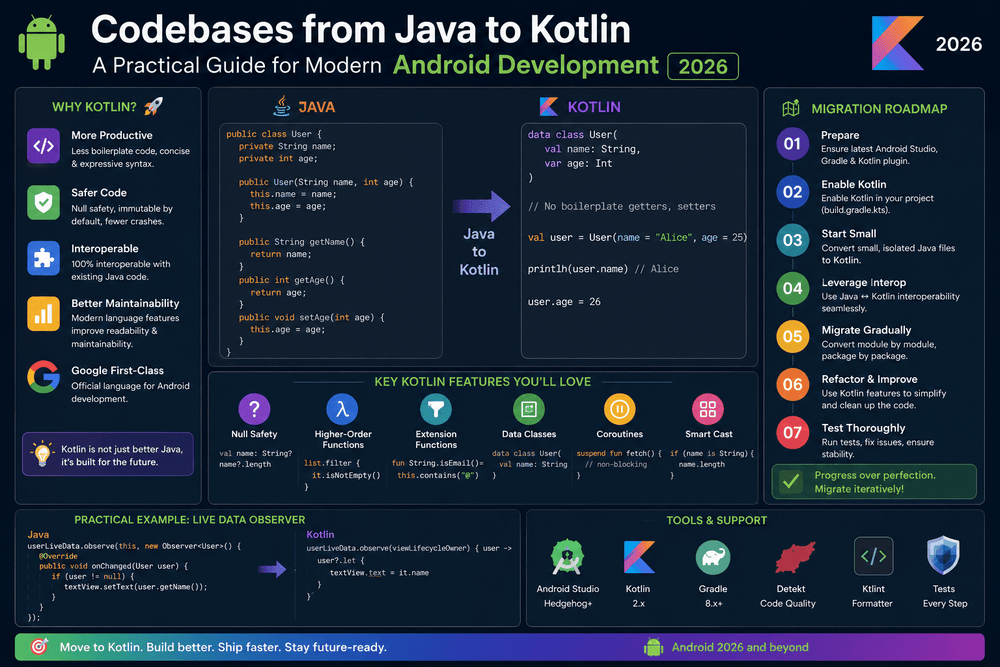
Codebases from Java to Kotlin A Practical Guide for Modern Android Development 2026
Migrating Legacy Android Codebases from Java to Kotlin
Many Android applications were originally built with Java and have been maintained for years. These legacy Android codebases can contain thousands of lines of code, multiple dependencies, old architectural patterns, and business logic that developers cannot easily replace without introducing risk.
Kotlin has become a major language for modern Android development, offering concise syntax, null-safety, extension functions, coroutines, and other features designed to make application development more productive. Google officially announced Kotlin as a first-class language for Android development in 2017 and has continued to recommend Kotlin for new Android projects.
However, migrating a large Android application from Java to Kotlin is not simply a matter of translating every file. A successful Java to Kotlin migration requires planning, testing, gradual implementation, and a clear understanding of how Java and Kotlin work together.
The good news is that developers do not need to rewrite an entire application overnight. Kotlin and Java have strong interoperability, allowing teams to migrate an existing Android codebase incrementally.
This guide explains how to approach a legacy Android codebase migration from Java to Kotlin, what challenges to expect, and how to reduce technical risk during the process.
Why Migrate a Legacy Android App from Java to Kotlin?
Before starting a migration, it is important to understand why the change is worth the effort.
1. Kotlin Is Designed for Modern Android Development
Kotlin provides features that can reduce repetitive code and make common programming tasks easier.
For example, Java code may require verbose getter and setter methods, while Kotlin properties provide a more concise approach.
Java:
public String getName() {
    return name;
}
Kotlin:
val name: String
The difference may appear small in an individual class, but across a large application, reducing boilerplate can make the codebase easier to understand and maintain.
2. Kotlin Provides Null-Safety
Null-related errors have historically been a common source of crashes in Android applications.
Kotlin’s type system distinguishes between nullable and non-nullable types.
var username: String = "Alex"
var nickname: String? = null
The ? explicitly indicates that a value may be null.
This encourages developers to consider nullability during development rather than discovering certain problems later at runtime.
3. Better Support for Modern Android APIs
Kotlin works naturally with many modern Android development technologies, including Jetpack libraries, Jetpack Compose, coroutines, and Flow.
Although Java remains supported, Kotlin is often the more convenient choice when adopting newer Android development patterns.
4. Improved Developer Productivity
Kotlin’s concise syntax can reduce the amount of code developers need to write and maintain. Features such as extension functions, smart casts, data classes, default parameters, and lambda expressions can make everyday development tasks more straightforward.
Java and Kotlin Interoperability Makes Migration Easier
One of the biggest advantages of migrating an existing Android project is that Java and Kotlin can coexist.
You do not have to convert every Java file before compiling the application.
A Java class can call Kotlin code, and Kotlin can interact with Java classes. This interoperability makes incremental migration possible.
For example, an existing Java repository might remain unchanged while a new Kotlin ViewModel is introduced around it.
This allows development teams to migrate individual components without stopping feature development.
The official Kotlin documentation provides extensive guidance on Java interoperability, including how Kotlin interacts with Java methods, fields, classes, and other language features. (kotlinlang.org)
Should You Rewrite the Entire Android App?
In most cases, a complete rewrite is not the best starting point.
A full rewrite can introduce several risks:
- Existing business logic may be accidentally changed.
- Bugs may be introduced during translation.
- Development can take considerably longer.
- Existing features may need to be tested again from scratch.
- The team may need to maintain two implementations temporarily.
- Product development may slow down.
A gradual Java to Kotlin migration is usually easier to manage.
Instead of asking, “How can we convert the entire application?”, ask:
“Which part of the application should we migrate first?”
This shift in thinking makes the migration more practical.
Step 1: Audit the Legacy Android Codebase
Before converting code, analyze the project.
Identify:
- Java source files
- Android modules
- Build configuration
- Third-party libraries
- Networking layers
- Database components
- Activities and Fragments
- Adapters
- ViewModels
- Repositories
- Utility classes
- Tests
- Generated code
- Deprecated Android APIs
You should also identify areas that are particularly fragile.
For example, if an old Java class handles authentication, database operations, and UI state simultaneously, converting it directly into Kotlin may preserve the same architectural problems.
Migration is an opportunity to improve code quality, but it does not mean every file should be redesigned at the same time.
Step 2: Establish a Strong Testing Baseline
Testing should come before large-scale migration.
If the existing application has automated tests, run them before converting important components.
You want to know:
Does the application behave correctly before migration?
Then, after migration:
Does it still behave correctly?
Useful tests include:
- Unit tests
- Integration tests
- UI tests
- Repository tests
- Database tests
- API-related tests
A strong test suite acts as a safety net.
If an application has limited test coverage, consider adding tests around critical business logic before migrating that code.
Step 3: Configure Kotlin in the Existing Project
Once the project has been evaluated, introduce Kotlin into the existing Android build.
Modern Android projects commonly use Gradle-based configuration. Android Studio provides tooling that can help add Kotlin support and convert Java files to Kotlin.
The exact Gradle configuration can vary depending on the Android Gradle Plugin, Kotlin version, project structure, and build setup.
For long-term maintainability, keep the Kotlin and Android toolchain versions compatible and follow the current official Android documentation rather than copying outdated configuration from old tutorials.
Step 4: Start with Low-Risk Components
Your first migration should generally not be the most complicated part of the application.
Good candidates include:
- Small utility classes
- Simple data models
- Stateless helpers
- Small adapters
- Isolated business logic
- Unit-tested classes
For example, a simple Java model can often be converted into a Kotlin data class.
Java:
public class Product {
    private final String name;
    private final double price;

    public Product(String name, double price) {
        this.name = name;
        this.price = price;
    }

    public String getName() {
        return name;
    }

    public double getPrice() {
        return price;
    }
}
Kotlin:
data class Product(
    val name: String,
    val price: Double
)
The Kotlin version is significantly shorter while preserving the basic model’s purpose.
Step 5: Use Android Studio’s Java-to-Kotlin Converter Carefully
Android Studio includes tools for converting Java code into Kotlin.
This can be an excellent starting point, but automatic conversion should not be treated as the final result.
A converted file may contain code such as:
!!
The double-bang operator forces a nullable value to be treated as non-null.
While it can sometimes be appropriate, excessive use of !! may simply transfer Java’s null-related risks into Kotlin.
After conversion, developers should review:
- Nullability
- Collection types
- Visibility modifiers
- Kotlin idioms
- Extension functions
- Data classes
- Property declarations
- Exception handling
- Threading
- Lifecycle behavior
The goal is not merely to produce code that compiles. The goal is to produce good Kotlin code.
Step 6: Improve the Converted Kotlin Code
Automatic conversion often produces Kotlin code that is technically valid but not particularly idiomatic.
For example, a converted class might contain unnecessary getters and setters.
Instead of keeping Java-style patterns, use Kotlin’s language features where they improve readability.
Use Data Classes
Data classes are useful for objects primarily designed to hold data.
data class User(
    val id: Long,
    val name: String,
    val email: String
)
Use Safe Calls
Instead of manually checking for null:
if (user != null) {
    println(user.name)
}
Kotlin can often express the same idea with:
println(user?.name)
Use Elvis Operators
For default values:
val displayName = user?.name ?: "Guest"
These features can make the migrated code easier to read while making nullability more explicit.
Step 7: Migrate Architecture Gradually
Once smaller components have been converted successfully, migration can move toward architectural layers.
A common modern Android architecture may include:
UI
 ↓
ViewModel
 ↓
Repository
 ↓
Data Source
 ↓
API / Database
You do not have to migrate all layers simultaneously.
For example, you can create a Kotlin ViewModel that communicates with an existing Java repository.
Later, the repository can be converted.
Eventually, the data layer can be modernized with Kotlin features such as suspend functions and Flow where appropriate.
This approach reduces the size of each individual migration step.
Migrating Java Activities and Fragments
Activities and Fragments often contain a mixture of UI logic, lifecycle handling, navigation, and business logic.
For that reason, they may be more complicated to migrate than simple models.
When converting an Activity or Fragment, avoid blindly translating every line.
Instead, examine whether the class contains responsibilities that should be moved elsewhere.
For example:
Old Activity
 ├── API request
 ├── Database operation
 ├── Business rules
 ├── UI updates
 └── Navigation
A more maintainable architecture could become:
Activity / Fragment
        ↓
    ViewModel
        ↓
   Repository
        ↓
Data sources
This means migration can improve the architecture rather than simply changing the programming language.
Kotlin Coroutines for Legacy Asynchronous Code
Many older Android applications use callbacks, AsyncTask, handlers, or manually managed threads.
Kotlin Coroutines can provide a cleaner approach for asynchronous programming.
For example, instead of deeply nested callbacks, a suspend function can represent an asynchronous operation:
suspend fun loadUser(): User {
    return api.getUser()
}
A ViewModel can then launch the operation within its lifecycle-aware scope:
viewModelScope.launch {
    val user = repository.loadUser()
    updateUi(user)
}
Android’s official documentation recommends coroutines for asynchronous programming and provides guidance on using structured concurrency and appropriate coroutine scopes. (developer.android.com)
However, developers should avoid adding coroutines everywhere simply because the application is being migrated to Kotlin.
Convert asynchronous code when there is a clear technical benefit and when the surrounding architecture is ready.
Migrating Collections and Utility Code
Java collection APIs can often be replaced with Kotlin’s expressive collection operations.
For example:
val activeUsers = users
    .filter { it.isActive }
    .sortedBy { it.name }
This style can be easier to read than a traditional loop with temporary collections.
Kotlin also provides convenient functions such as:
mapfilterfindfirstOrNullanyallassociategroupBy
However, developers should still consider performance when processing large collections. Concise syntax does not automatically make every operation faster.
Common Challenges During Java to Kotlin Migration
Nullability Differences
Java allows references to be null without expressing that possibility in the type system.
Kotlin requires more explicit handling.
This is one of the most important conceptual differences during migration.
Platform Types
When Kotlin interacts with Java code, it may encounter platform types whose nullability is not fully known to Kotlin.
Developers should pay particular attention to Java APIs and carefully define Kotlin types when introducing boundaries between Java and Kotlin.
Dependency Compatibility
Some older libraries may have limited Kotlin support or rely heavily on Java-specific patterns.
Before migration, review important dependencies and verify their compatibility with your target Android and Kotlin versions.
Generated Code and Annotation Processing
Legacy Android applications may rely on annotation processors and older build systems.
When modernizing the project, teams may need to review these tools and consider current alternatives where appropriate.
Team Familiarity
A migration can fail if developers know Java well but have limited experience with Kotlin.
Teams should establish coding conventions and encourage developers to understand Kotlin fundamentals rather than simply translating Java syntax.
How to Avoid a Risky Migration
A successful migration is usually incremental.
A practical strategy is:
- Audit the existing application.
- Establish automated tests.
- Introduce Kotlin into the project.
- Choose a small migration target.
- Convert the selected Java file.
- Review and improve the generated Kotlin.
- Run tests.
- Release or validate the change.
- Monitor for regressions.
- Continue with the next component.
This approach creates measurable progress without turning the entire project into a high-risk rewrite.
Java to Kotlin Migration Best Practices
Keep these principles in mind throughout the project:
Migrate Incrementally
Small pull requests are easier to review, test, and revert.
Preserve Behavior First
The first goal of a migration should be to preserve functionality. Architectural improvements can be introduced gradually.
Avoid Mixing Too Many Changes
Do not simultaneously convert a file, redesign its architecture, replace its database layer, change its networking library, and redesign the UI unless there is a strong reason.
Too many simultaneous changes make debugging difficult.
Write Idiomatic Kotlin
Do not create “Java written in Kotlin.”
Use Kotlin’s features when they make the code clearer and safer.
Protect Public APIs
If other modules depend on a class, carefully consider the impact of changing its API.
Keep Testing
Run tests after every meaningful migration step.
Conclusion
Migrating a legacy Android application from Java to Kotlin can be a valuable long-term investment, but it should be approached as an engineering project rather than a simple file-conversion exercise.
Kotlin provides modern language features, strong null-safety, concise syntax, and excellent integration with the Android ecosystem. More importantly, Java and Kotlin interoperability makes it possible to modernize an existing Android application gradually.
The safest approach is to begin with a codebase audit, establish a testing baseline, introduce Kotlin incrementally, convert low-risk components first, and then move toward larger architectural layers.
As the migration progresses, teams can gradually adopt modern Android practices such as ViewModel-based architecture, Kotlin Coroutines, Flow, Jetpack libraries, and other current development tools.
The ultimate objective should not be to have “zero Java” as quickly as possible. The real goal is to create a more maintainable, reliable, testable, and modern Android codebase while protecting the application’s existing functionality.
With careful planning and incremental execution, Java to Kotlin migration can transform a legacy Android project without requiring a risky full rewrite.
Trusted Sources and Further Reading
- Android Developers — Kotlin for Android: Official Android guidance for Kotlin development and Android-specific Kotlin resources.
https://developer.android.com/kotlin - Kotlin Documentation — Java Interoperability: Official documentation covering interaction between Kotlin and Java.
https://kotlinlang.org/docs/java-interop.html - Android Developers — Kotlin Coroutines: Official guidance for asynchronous programming with Kotlin Coroutines on Android.
https://developer.android.com/kotlin/coroutines - Android Developers — Kotlin and Android: Official Android developer resources covering Kotlin and modern Android development.
https://developer.android.com/kotlin - Kotlin Documentation: Official language documentation covering Kotlin syntax, features, and best practices.
https://kotlinlang.org/docs/
About The Author