Implementing MVVM Architecture with Jetpack ViewModel and LiveData in Android 2026
MVVM Architecture with Jetpack
Building a small Android application can feel simple at first. However, as an application grows, its codebase can quickly become difficult to maintain. Activities and Fragments may start handling network requests, database operations, business rules, UI updates, and navigation all in the same place.
This approach can work temporarily, but it often creates tightly coupled code that becomes difficult to test and modify.
This is one reason why MVVM architecture in Android became such a popular architectural pattern. Model-View-ViewModel, commonly called MVVM, separates responsibilities into different layers and helps developers create applications that are easier to understand, test, and maintain.
Android’s architecture guidance emphasizes separation of concerns and recommends using architecture components such as ViewModel to manage UI-related data in a lifecycle-conscious way.
Two important technologies associated with traditional Android MVVM implementations are Jetpack ViewModel and LiveData. ViewModel helps preserve and manage UI-related state across configuration changes, while LiveData provides a lifecycle-aware observable data holder.
In this guide, we will explore how to implement MVVM architecture with Jetpack ViewModel and LiveData, understand how the components communicate, and examine practical best practices for modern Android applications.
What Is MVVM Architecture in Android?
MVVM stands for:
- Model
- View
- ViewModel
The objective is to separate application responsibilities instead of placing everything inside an Activity or Fragment.
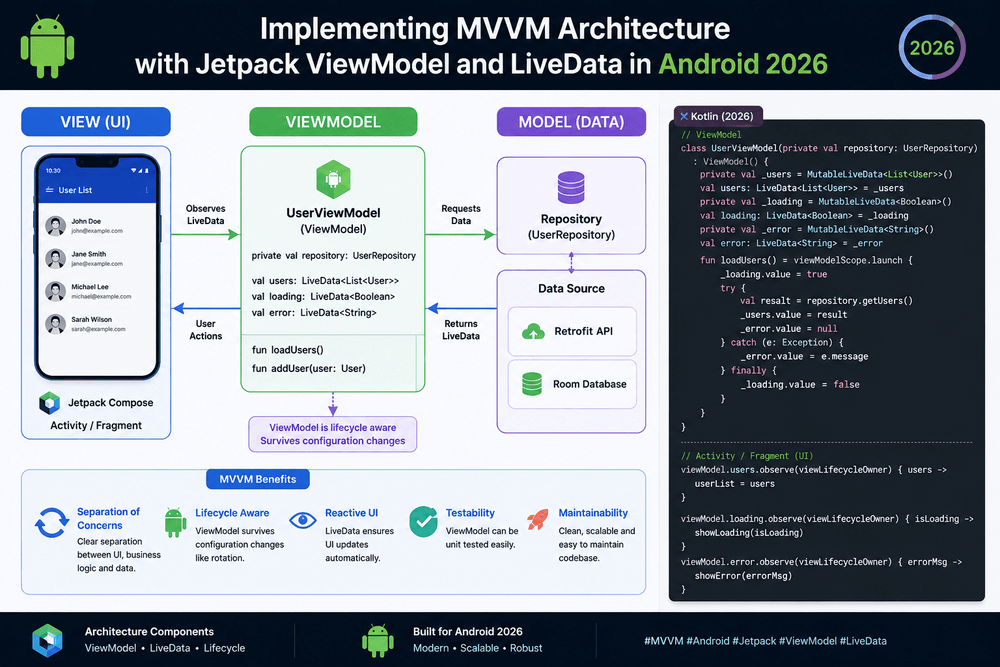
A simplified Android MVVM architecture looks like this:
             User Interaction
                    ↓
              View
        Activity / Fragment
                    ↓
              ViewModel
                    ↓
             Repository
                    ↓
          Data Sources
          ↙          ↘
      API            Database
Each layer has a specific responsibility.
Model
The Model represents application data and data-related operations.
It may include:
- API services
- Database access
- Data classes
- Repositories
- Local data sources
- Remote data sources
View
The View is responsible for displaying information and receiving user interaction.
In traditional Android applications, this may be an Activity or Fragment.
The View should avoid containing business logic whenever possible.
ViewModel
The ViewModel acts as a bridge between the UI and the data layer.
It prepares data for the UI, manages UI-related state, and communicates with repositories or other data sources.
Android’s official documentation recommends ViewModel as a component for storing and managing UI-related data in a lifecycle-conscious way.
Why Use MVVM in Android Development?
There are several reasons developers choose MVVM for Android applications.
Separation of Concerns
Each component has a clearer responsibility.
Instead of putting API calls, database queries, and UI logic into an Activity, these responsibilities can be distributed across appropriate layers.
Easier Testing
Business logic inside a ViewModel can generally be tested without launching a complete Android UI.
This can make unit testing more practical.
Better Maintainability
When responsibilities are separated, changing one part of an application is less likely to require changes throughout the entire codebase.
Lifecycle Awareness
ViewModel and LiveData are designed to work with Android lifecycle concepts.
This can reduce common problems related to configuration changes and UI components being recreated.
Understanding Jetpack ViewModel
The Android ViewModel class is one of the core components used in Android application architecture.
A ViewModel is designed to store and manage UI-related data while allowing that data to survive configuration changes such as screen rotation.
For example:
class UserViewModel : ViewModel() {

    var username = "Alex"
}
An Activity can obtain the ViewModel using the Android ViewModel APIs:
private val viewModel: UserViewModel by viewModels()
When the Activity is recreated because of a configuration change, the ViewModel can remain associated with the Activity’s lifecycle owner.
This is particularly useful for data that should not be unnecessarily reloaded during every configuration change.
What Is LiveData?
LiveData is an observable data holder that is lifecycle-aware.
Instead of manually asking the UI to refresh every time data changes, a component can observe LiveData and respond when a new value becomes available.
For example:
val username = MutableLiveData<String>()
The ViewModel can update the value:
username.value = "Alex"
The Activity or Fragment can observe it:
viewModel.username.observe(viewLifecycleOwner) { name ->
    textView.text = name
}
LiveData only updates active observers according to lifecycle state, which helps avoid certain lifecycle-related problems.
Android documentation describes LiveData as an observable data holder class that is lifecycle-aware.
ViewModel and LiveData Together
The real benefit appears when ViewModel and LiveData are combined.
Consider an application that displays a list of products.
The ViewModel might expose:
class ProductViewModel : ViewModel() {

    private val _products = MutableLiveData<List<Product>>()
    val products: LiveData<List<Product>> = _products
}
The UI observes the public LiveData:
viewModel.products.observe(viewLifecycleOwner) { products ->
    adapter.submitList(products)
}
The ViewModel owns the mutable state, while the UI only observes it.
This creates a useful separation:
Repository
     ↓
ViewModel
     ↓
LiveData
     ↓
Activity / Fragment
     ↓
UI
The Activity does not need to know how the products were retrieved.
Why Expose LiveData Instead of MutableLiveData?
A common MVVM best practice is to keep mutable data private.
Instead of:
val products = MutableLiveData<List<Product>>()
prefer:
private val _products = MutableLiveData<List<Product>>()

val products: LiveData<List<Product>>
    get() = _products
This prevents external UI components from modifying the ViewModel’s state directly.
The ViewModel remains responsible for changing the data.
This principle is sometimes described as single ownership of mutable state.
It makes the application’s data flow easier to understand and reduces accidental modifications.
Introducing the Repository Layer
A ViewModel should generally not contain all data-access details.
For example, avoid creating a ViewModel like this:
class ProductViewModel : ViewModel() {

    fun loadProducts() {
        // API request
        // Database query
        // Business logic
        // UI updates
    }
}
As the application grows, this class can become difficult to maintain.
A repository can provide a cleaner separation.
class ProductRepository(
    private val api: ProductApi
) {

    suspend fun getProducts(): List<Product> {
        return api.getProducts()
    }
}
The ViewModel communicates with the repository:
class ProductViewModel(
    private val repository: ProductRepository
) : ViewModel() {

    private val _products = MutableLiveData<List<Product>>()
    val products: LiveData<List<Product>> = _products

    fun loadProducts() {
        // Load data through repository
    }
}
This structure makes it easier to change the data source later.
For example, the repository could eventually combine data from:
- REST APIs
- Room databases
- Local files
- Cache
- Remote services
without requiring the UI to understand those implementation details.
MVVM Data Flow in a Real Android Application
Imagine an application displaying a list of news articles.
The user opens the screen.
The process might look like this:
User opens screen
       ↓
Fragment
       ↓
ViewModel
       ↓
Repository
       ↓
API
       ↓
Repository
       ↓
ViewModel
       ↓
LiveData
       ↓
Fragment
       ↓
RecyclerView
The Fragment is mainly responsible for displaying the result.
The ViewModel manages UI-related state.
The Repository handles data access.
This separation makes the application’s behavior easier to follow.
Handling Loading and Error States
A real application needs more than a successful data result.
The UI may need to display:
- Loading
- Success
- Empty state
- Error
- Retry
A useful approach is to represent UI state explicitly.
For example:
sealed class UiState {
    object Loading : UiState()
    data class Success(val products: List<Product>) : UiState()
    data class Error(val message: String) : UiState()
}
The ViewModel can expose:
private val _uiState = MutableLiveData<UiState>()
val uiState: LiveData<UiState> = _uiState
The UI can then react to each state.
This is generally easier to maintain than having several unrelated Boolean variables such as:
isLoading
hasError
isEmpty
isSuccessful
Explicit UI states make the possible application states easier to reason about.
ViewModel and Coroutines
Modern Android applications frequently combine ViewModel with Kotlin Coroutines.
For example:
fun loadProducts() {
    viewModelScope.launch {
        try {
            _uiState.value = UiState.Loading

            val products = repository.getProducts()

            _uiState.value = UiState.Success(products)
        } catch (exception: Exception) {
            _uiState.value =
                UiState.Error("Unable to load products")
        }
    }
}
viewModelScope is tied to the lifecycle of the ViewModel.
When the ViewModel is cleared, coroutines launched in this scope are cancelled.
Android’s official coroutine guidance recommends structured concurrency and lifecycle-aware coroutine scopes for Android applications.
This combination can make asynchronous operations much easier to manage than older callback-based approaches.
Testing an MVVM Android Application
One major advantage of MVVM architecture is improved testability.
A ViewModel can often be tested independently of the UI.
For example, you might test that:
- The ViewModel requests data from the repository.
- Loading state is emitted correctly.
- Successful data is exposed.
- Errors are handled.
- Empty results are represented correctly.
A simplified test concept might look like:
@Test
fun loadProducts_returnsProducts() {
    // Given
    // When
    // Then
}
The exact testing implementation depends on the project’s architecture and libraries, but separating responsibilities makes testing considerably easier.
Android’s architecture recommendations emphasize testable application design and separation of concerns.
Common MVVM Mistakes to Avoid
MVVM is not automatically a good architecture simply because classes are named “ViewModel” and “Repository.”
Several mistakes are common.
1. Putting Everything in the ViewModel
A ViewModel should not become a replacement for an Activity.
If it contains networking, database implementation, navigation, formatting, and large amounts of business logic, it may become difficult to maintain.
2. Making the Activity Too Smart
The opposite problem is also possible.
An Activity that performs API calls, transforms data, manages database operations, and controls application logic defeats much of the purpose of MVVM.
3. Exposing MutableLiveData
Keep mutable state private whenever possible.
Expose immutable LiveData to the UI.
4. Ignoring Lifecycle Behavior
Always consider the lifecycle of Activities and Fragments when observing data.
For Fragment views, using the appropriate viewLifecycleOwner is particularly important.
5. Creating ViewModels with Android Context Unnecessarily
Avoid placing unnecessary references to Activities or Views inside ViewModels.
This can create lifecycle and memory-management problems.
If application-level dependencies are required, use appropriate dependency-injection and architecture patterns.
MVVM with Jetpack Compose
Although LiveData is commonly associated with XML-based Android interfaces, it can also be observed from Jetpack Compose.
For example:
val products by viewModel.products.observeAsState(emptyList())
Compose can then display the current state.
However, modern Android development increasingly favors Kotlin StateFlow for many new state-management scenarios.
This does not make LiveData useless. Existing applications may already use LiveData extensively, and it remains an important Android architecture component.
For new projects, developers should evaluate whether StateFlow or another reactive state solution better matches the application’s architecture.
LiveData vs StateFlow
Both LiveData and StateFlow can be used to represent observable state, but they have different characteristics.
| Feature | LiveData | StateFlow |
|---|---|---|
| Kotlin-first API | No | Yes |
| Lifecycle-aware by itself | Yes | No |
| Requires initial value | Not always | Yes |
| Works naturally with Coroutines | Limited compared with Flow | Yes |
| Useful for existing Android apps | Excellent | Excellent |
| Common in modern Kotlin architectures | Still supported | Increasingly common |
The correct choice depends on the project.
For a legacy application already using LiveData, migrating everything immediately may not be necessary.
For a new Kotlin-based application, StateFlow may be worth considering, especially when the architecture already uses Kotlin Coroutines and Flow.
Best Practices for MVVM Architecture
For a maintainable Android MVVM project, consider the following principles:
Keep the UI Focused on Presentation
Activities and Fragments should primarily display state and forward user actions.
Keep State Ownership Clear
The ViewModel should own UI state rather than allowing multiple components to modify it.
Use Repositories for Data Access
Repositories can hide the complexity of APIs, databases, caches, and other data sources.
Keep ViewModels Testable
Avoid unnecessary Android framework dependencies inside ViewModels.
Model UI States Explicitly
Represent loading, success, error, and empty states clearly.
Avoid Overengineering
MVVM should simplify the application, not create unnecessary layers for every tiny class.
Use Dependency Injection
Dependency injection can make repositories, ViewModels, and data sources easier to replace and test.
Keep Business Logic Out of the View
The UI should not become responsible for decisions that belong to the application’s business or presentation layers.
A Practical MVVM Project Structure
A project might be organized like this:
com.example.myapp
│
├── data
│   ├── api
│   ├── database
│   └── repository
│
├── model
│   ├── Product.kt
│   └── User.kt
│
├── ui
│   ├── product
│   │   ├── ProductFragment.kt
│   │   └── ProductViewModel.kt
│   │
│   └── user
│       ├── UserFragment.kt
│       └── UserViewModel.kt
│
└── utils
The exact folder structure is not mandatory.
What matters most is that responsibilities are clearly separated.
Final Thoughts
Implementing MVVM architecture with Jetpack ViewModel and LiveData can significantly improve the organization of an Android application.
ViewModel provides a lifecycle-conscious location for UI-related data and presentation logic, while LiveData allows the UI to observe changes without constantly managing manual updates.
When combined with repositories, Kotlin Coroutines, dependency injection, and appropriate testing practices, MVVM can provide a solid foundation for scalable Android applications.
However, architecture should serve the application rather than become an objective by itself. A clean MVVM implementation is not about creating as many classes as possible. It is about giving each component a clear responsibility and establishing a predictable flow of data.
For existing Android applications, LiveData remains particularly useful when the project already relies on it. For new Kotlin-based projects, developers can also evaluate StateFlow and other modern reactive approaches.
The most important goal is to create an Android application that is maintainable, testable, lifecycle-aware, and easy for developers to understand. With those principles in place, MVVM becomes a practical architecture rather than simply a design pattern.
Trusted Sources and Further Reading
- Android Developers — Guide to App Architecture
Official Android guidance covering recommended architecture principles and application layers.
https://developer.android.com/topic/architecture - Android Developers — ViewModel
Official documentation explaining the ViewModel component and its role in managing UI-related data.
https://developer.android.com/topic/libraries/architecture/viewmodel - Android Developers — LiveData
Official documentation for lifecycle-aware observable data holders.
https://developer.android.com/topic/libraries/architecture/livedata - Android Developers — Kotlin Coroutines
Official Android guidance for asynchronous programming and lifecycle-aware coroutine usage.
https://developer.android.com/kotlin/coroutines - Android Developers — Guide to App Architecture: Recommendations
Official recommendations for building scalable and maintainable Android applications.
https://developer.android.com/topic/architecture/recommendations
About The Author