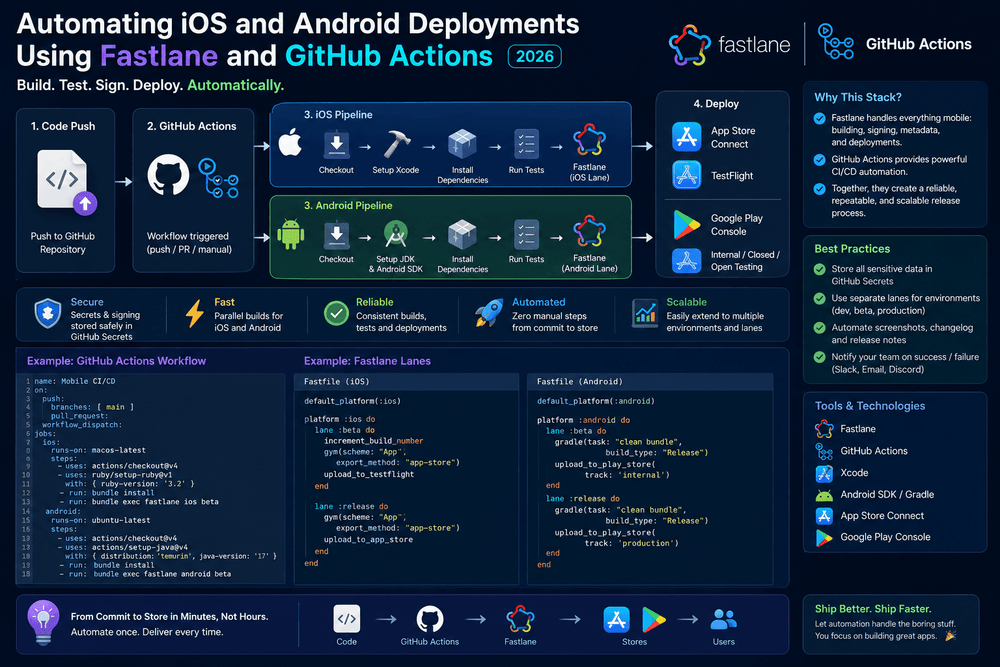
Automating iOS and Android Deployments Using Fastlane and GitHub Actions
Publishing a mobile application can become repetitive when developers have to build, sign, test, and upload every release manually. This is especially true when the same application targets both iOS and Android. A reliable mobile CI/CD pipeline can reduce that repetitive work and make releases more consistent.
One practical approach is to combine Fastlane with GitHub Actions. Fastlane provides automation tools for common mobile release tasks, while GitHub Actions can run those tasks automatically when code changes or a release is created. GitHub describes Actions as a CI/CD platform capable of building, testing, packaging, and deploying software through automated workflows.
This guide explains how to build a practical Fastlane and GitHub Actions deployment workflow for iOS and Android, how the pieces fit together, and which security and maintenance practices are worth adopting.
What Is Mobile CI/CD?
CI/CD stands for Continuous Integration and Continuous Delivery or Deployment.
Continuous integration allows developers to automatically build and test application changes after they are pushed to a repository. Continuous deployment extends this process by automating the delivery of successful builds to a target environment or distribution platform.
GitHub Actions supports both approaches. Workflows can be triggered by events such as pushes and pull requests, scheduled to run automatically, or started manually.
For mobile applications, a CI/CD pipeline can handle tasks such as:
- Installing dependencies
- Running automated tests
- Building Android packages
- Building iOS applications
- Managing application versions
- Signing release builds
- Uploading releases
- Running deployment checks
- Publishing build artifacts
Instead of repeating these tasks manually for every release, developers can define them once and allow the automation pipeline to execute them consistently.
Why Use Fastlane With GitHub Actions?
Fastlane and GitHub Actions solve different parts of the automation problem.
Fastlane focuses on mobile development automation. It can organize repetitive tasks into reusable lanes, making commands such as building and distributing an application easier to manage.
GitHub Actions, on the other hand, provides the environment in which those commands can run. A GitHub Actions workflow can check out your repository, install dependencies, execute Fastlane, and preserve build results.
The combination is powerful because your release process can live alongside your application source code.
A simplified workflow looks like this:
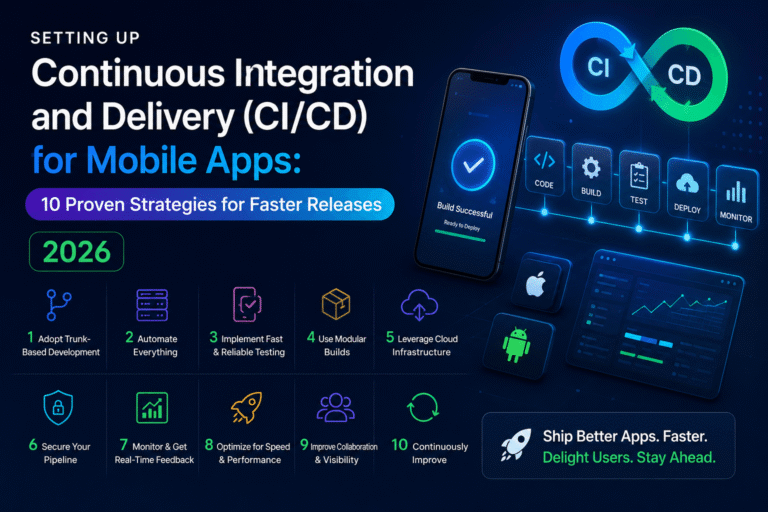
Developer → GitHub → Tests → Fastlane → Build → Sign → Store Upload
GitHub Actions supports workflows composed of jobs and steps, with jobs running on GitHub-hosted or self-hosted runners.
This structure also makes the deployment process easier to review. Team members can see what happens during a release instead of relying on a collection of undocumented commands on one developer’s computer.
Prerequisites
Before creating your mobile deployment pipeline, prepare the following:
- A GitHub repository
- An iOS or Android project
- Fastlane configured in the project
- Appropriate Apple or Google Play developer access
- Application signing configuration
- A working local build
- Automated tests where possible
- GitHub Actions enabled for the repository
For iOS deployments, you will generally need access to Apple’s development and distribution infrastructure.
For Android deployments, you need the appropriate Google Play Console configuration and signing credentials.
The most important rule is simple: make sure the application can be built and released manually before automating the process.
Automation does not fix an incorrectly configured project. It simply repeats the configuration problem faster.
Setting Up Fastlane
Fastlane uses a configuration file called a Fastfile to define automation lanes.
A lane represents a specific task or release process. For example, a project might have separate lanes for testing, beta distribution, and production deployment.
A simplified Fastlane structure might look like:
default_platform(:ios)

platform :ios do
  desc "Run tests"
  lane :test do
    scan
  end

  desc "Build and distribute"
  lane :release do
    scan
    build_app
    upload_to_app_store
  end
end
The exact actions and configuration should be adapted to your project. The important idea is to keep the release process organized in a predictable place.
For Android, you can define equivalent lanes for building and distributing your application.
A well-designed Fastlane configuration can also separate development, beta, and production releases. This prevents every workflow from having to contain a large collection of shell commands.
Automating Android Deployment
Android deployment can be automated by creating a Fastlane lane that builds the application and sends the resulting release to Google Play.
A typical Android release pipeline can contain these stages:
- Check out the source code.
- Install dependencies.
- Run tests.
- Build the release artifact.
- Sign the application.
- Upload the release.
- Store useful build information.
Depending on the project, the generated artifact may be an Android App Bundle (.aab) rather than an APK.
A conceptual Fastlane lane could look like:
platform :android do
  desc "Build and deploy Android release"
  lane :release do
    gradle(task: "bundleRelease")
    supply(
      track: "production"
    )
  end
end
The exact authentication and Google Play configuration should be stored securely rather than embedded directly in source code.
This approach means that a successful GitHub Actions workflow can invoke the Android release lane without requiring the developer to manually upload every build.
Automating iOS Deployment
iOS deployment has additional requirements because Apple builds and distribution depend heavily on certificates, provisioning, signing, and App Store Connect configuration.
A typical iOS pipeline can include:
- Check out the repository.
- Install project dependencies.
- Install required Ruby dependencies.
- Run unit tests.
- Configure signing.
- Build the application.
- Upload the build to App Store Connect.
- Save logs and artifacts.
A simplified Fastlane lane could look like:
platform :ios do
  desc "Build and upload iOS release"
  lane :release do
    scan
    build_app(
      scheme: "MyApp"
    )
    upload_to_app_store
  end
end
The actual scheme, workspace, signing configuration, and distribution method depend on the application.
For production projects, avoid placing certificates, private keys, or authentication credentials directly inside the repository.
Connecting Fastlane to GitHub Actions
Once Fastlane works locally, GitHub Actions can execute it automatically.
GitHub workflows are YAML files stored in the .github/workflows directory. GitHub’s documentation confirms that workflows can automate tasks such as building, testing, packaging, and deployment.
A simplified Android workflow might look like:
name: Android Release

on:
  workflow_dispatch:

jobs:
  deploy:
    runs-on: ubuntu-latest

    steps:
      - name: Checkout
        uses: actions/checkout@v6

      - name: Set up Java
        uses: actions/setup-java@v5
        with:
          distribution: temurin
          java-version: "17"

      - name: Install dependencies
        run: bundle install

      - name: Deploy with Fastlane
        run: bundle exec fastlane android release
This example is intentionally minimal. A production workflow should also configure the Android SDK, caching, credentials, signing, tests, and project-specific dependencies.
For iOS, the workflow normally needs a macOS runner because the Apple toolchain requires macOS.
A simplified structure could be:
name: iOS Release

on:
  workflow_dispatch:

jobs:
  deploy:
    runs-on: macos-latest

    steps:
      - name: Checkout
        uses: actions/checkout@v6

      - name: Install Ruby dependencies
        run: bundle install

      - name: Deploy with Fastlane
        run: bundle exec fastlane ios release
The actual macOS runner version should be selected according to the Xcode version and compatibility requirements of your project.
Managing Secrets Securely
Security is one of the most important parts of a GitHub Actions mobile deployment pipeline.
Mobile applications use credentials that should never be committed to a public repository. Examples include signing-related credentials, API credentials, and store authentication information.
GitHub Actions provides secrets and environments that can restrict access to sensitive information. GitHub also recommends deployment environments for controlling access and adding protection rules around deployments.
A safer architecture is:
Repository → GitHub Secrets/Environment → Workflow → Fastlane
Instead of:
Repository → Hard-coded credentials
Never put private keys or passwords directly inside:
Fastfile- Workflow YAML
- Source code
- Public configuration files
- Documentation committed to the repository
For production deployments, consider using a protected GitHub environment such as production. Environment protection can require approval before a deployment job proceeds.
This is particularly useful for teams where every successful build should not automatically become a public production release.
Adding Tests Before Deployment
A deployment pipeline should not simply build and upload an application.
A better approach is:
Code → Lint → Unit Tests → Build → Release
GitHub recommends using CI workflows to build and test code and report the results to pull requests.
For a mobile project, tests might include:
- Unit tests
- UI tests
- Static analysis
- Lint checks
- Dependency checks
- Build validation
For example:
- name: Run tests
  run: bundle exec fastlane test
If the test step fails, the deployment job should stop.
This simple rule can prevent a broken application from reaching testers or production users.
Creating a Production Release Workflow
A mature deployment pipeline should distinguish between testing and production.
For example:
Pull Request
Run:
- Code checks
- Unit tests
- Linting
- Debug build
Main Branch
Run:
- Full test suite
- Release build
- Internal distribution
Production Release
Run:
- Final tests
- Production build
- Signing
- Manual approval
- Store upload
GitHub Actions supports events such as push, pull_request, and workflow_dispatch, allowing teams to decide when a workflow should run.
Manual triggering can be especially useful for production releases because it gives developers a final opportunity to verify the release before publishing it.
GitHub’s deployment environments can also provide approval and secret-management controls for production jobs.
Common Deployment Problems
Even a carefully designed Fastlane GitHub Actions workflow can fail. Understanding common problems makes troubleshooting much easier.
1. Signing Errors
Incorrect certificates, provisioning profiles, keystores, or signing configuration can cause builds to fail.
Keep signing configuration consistent between local development and CI.
2. Missing Environment Variables
A workflow may work locally because your computer already has required credentials.
The GitHub runner starts with a fresh environment, so required values must be configured explicitly.
3. Wrong Toolchain Version
Mobile development depends on specific versions of:
- Xcode
- Ruby
- Java
- Gradle
- Android SDK
- CocoaPods
- Fastlane
A version mismatch can cause unexpected build failures.
4. Store Authentication Problems
Apple and Google Play authentication must be configured correctly.
Avoid testing production credentials unnecessarily. Start with a controlled environment and verify each authentication component independently.
5. Long Build Times
Mobile builds can be expensive in CI time.
Dependency caching and appropriate workflow design can reduce repeated installation work. GitHub Actions supports dependency caching as part of its workflow features.
Best Practices for Mobile CI/CD
A reliable iOS and Android CI/CD pipeline should be simple enough to understand and strict enough to protect production.
Here are several practices worth following:
Keep Release Logic in Fastlane
Do not duplicate the same deployment commands across multiple GitHub workflows.
Put mobile-specific automation in Fastlane and let GitHub Actions orchestrate when it runs.
Keep Workflows Small
Separate testing, staging, and production when appropriate.
Smaller workflows are easier to debug and maintain.
Protect Production
Use GitHub environments, approval rules, and restricted secrets for production deployments.
Pin Important Dependencies
Avoid allowing critical tooling to change unexpectedly during a production release.
Version control can make builds more predictable.
Store Build Artifacts
Keeping generated artifacts and useful logs can make failed deployments easier to investigate.
Use Manual Production Releases
Automatic deployment is useful, but production releases often deserve an approval step.
Monitor Failed Workflows
A failed pipeline is valuable information. Review the logs, identify the root cause, and improve the workflow rather than simply rerunning it repeatedly.
A Practical Release Architecture
A clean architecture for many mobile projects looks like this:
Developer
   ↓
GitHub Pull Request
   ↓
Automated Tests
   ↓
Code Review
   ↓
Merge to Main
   ↓
GitHub Actions
   ↓
Fastlane
   ↓
Build & Sign
   ↓
Production Approval
   ↓
App Store / Google Play
This structure creates a clear separation between development and release.
It also makes the process easier for new team members to understand. Instead of asking which commands must be executed manually, they can inspect the workflow and Fastlane configuration.
Final Thoughts
Automating iOS and Android deployments using Fastlane and GitHub Actions can turn a repetitive release process into a predictable CI/CD pipeline.
Fastlane handles much of the mobile-specific automation, while GitHub Actions provides the workflow engine for running tests, builds, and deployments. Together, they can support a release process that is faster, more repeatable, and easier to maintain.
The key is not to automate everything immediately.
Start with a reliable local Fastlane setup. Add automated testing. Move the process into GitHub Actions. Protect production credentials. Then introduce approvals, caching, artifacts, and additional release environments as the project grows.
The result is a mobile deployment workflow where releasing an iOS or Android application becomes a controlled engineering process rather than a collection of manual steps.
Frequently Asked Questions
Can Fastlane deploy both iOS and Android apps?
Yes. Fastlane provides automation capabilities for both major mobile platforms, allowing teams to organize platform-specific release tasks into lanes.
Can GitHub Actions replace Fastlane?
GitHub Actions can execute build and deployment commands, but Fastlane provides mobile-focused automation that can make release logic easier to organize. Using both tools can provide a clean separation between workflow orchestration and mobile deployment tasks.
Is GitHub Actions suitable for mobile CI/CD?
Yes. GitHub Actions supports CI/CD workflows, hosted runners, reusable actions, testing, artifacts, deployment environments, and other automation features.
Should production deployment be fully automatic?
Not necessarily. For important applications, a protected production environment with an approval step can reduce accidental releases while retaining most of the benefits of automation. GitHub supports environments and deployment protection features for this purpose.
What is the biggest benefit of Fastlane and GitHub Actions?
The biggest benefit is consistency. Once the release process is properly configured, the same automated steps can be executed repeatedly instead of relying on a developer to remember every build, signing, testing, and distribution command.
Trusted Sources
For further technical details, developers should consult the official documentation for GitHub Actions and Fastlane. GitHub’s official documentation covers workflows, CI/CD, runners, environments, deployment controls, and secrets, while Fastlane’s documentation covers mobile automation and distribution workflows.
About The Author